Java has its roots in embedded systems—software that runs inside specialized devices, such as handheld computers, cellular phones, and fancy toasters. In those kinds of applications, it’s especially important that software errors be handled robustly. Most users would agree that it’s unacceptable for their phone to simply crash or for their toast (and perhaps their house) to burn because their software failed. Given that we can’t eliminate the possibility of software errors, it’s a step in the right direction to recognize and deal with anticipated application-level errors methodically.
Dealing with errors in some languages is entirely the responsibility
of the programmer. The language itself provides no help in identifying
error types and no tools for dealing with them easily. In the C language,
a routine generally indicates a failure by returning an “unreasonable”
value (e.g., the idiomatic -1 or
null). As the programmer, you must know
what constitutes a bad result and what it means. It’s often awkward to
work around the limitations of passing error values in the normal path of
data flow.[9] An even worse problem is that certain types of errors can
legitimately occur almost anywhere, and it’s prohibitive and unreasonable
to explicitly test for them at every point in the software.
Java offers an elegant solution to these problems through
exceptions. (Java exception handling is similar to,
but not quite the same as, exception handling in C++.) An
exception indicates an unusual condition or an error
condition. Program control becomes unconditionally transferred or
“thrown” to a specially designated section of code where it’s caught and
handled. In this way, error handling is orthogonal to (or independent of)
the normal flow of the program. We don’t have to have special return
values for all of our methods; errors are handled by a separate mechanism.
Control can be passed a long distance from a deeply nested routine and
handled in a single location when that is desirable, or an error can be
handled immediately at its source. A few standard Java API methods still
return -1 as a special value, but these
are generally limited to situations where we are expecting a special value
and the situation is not really out of bounds.[10]
A Java method is required to specify the exceptions it can throw (i.e., the ones that it doesn’t catch itself), and the compiler makes sure that callers of the method handle them. In this way, the information about what errors a method can produce is promoted to the same level of importance as its argument and return types. You may still decide to punt and ignore obvious errors, but in Java you must do so explicitly. (We’ll discuss “runtime exceptions,” which are not required to be declared or handled by the method, in a moment.)
Exceptions are represented by instances of the class
java.lang.Exception and
its subclasses. Subclasses of Exception can hold specialized information
(and possibly behavior) for different kinds of exceptional conditions.
However, more often they are simply “logical” subclasses that serve only
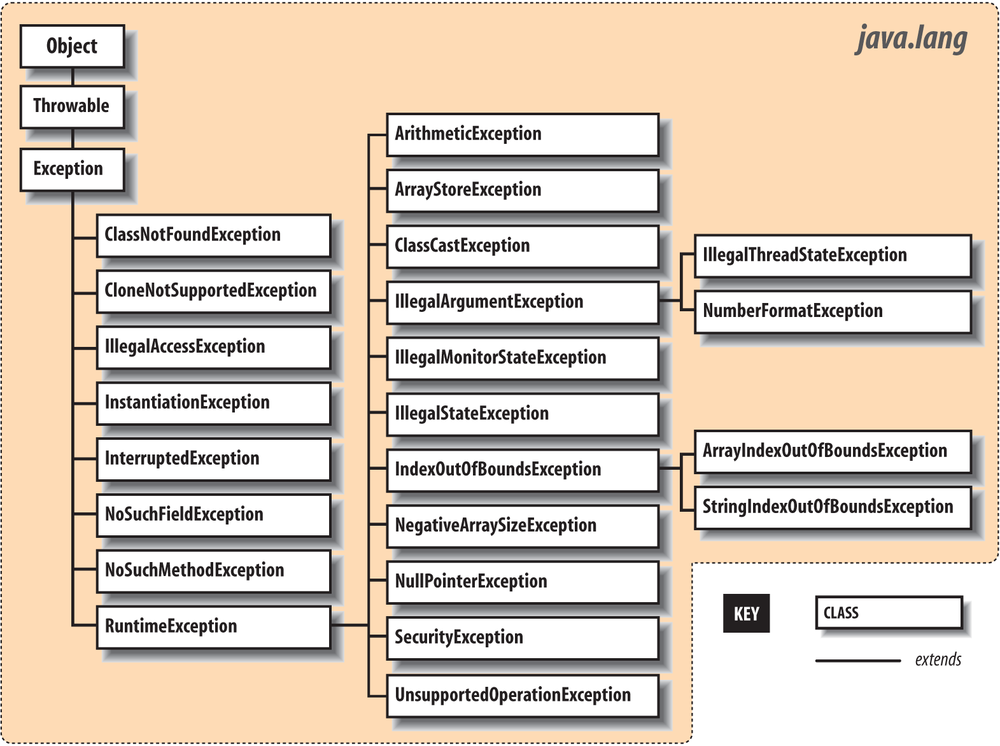
to identify a new exception type. Figure 4-1 shows the subclasses of Exception in the java.lang package. It
should give you a feel for how exceptions are organized. Most other
packages define their own exception types, which usually are subclasses
of Exception itself or of its
important subclass RuntimeException, which
we’ll get to in a moment.
For example, an important exception class is IOException in the
package java.io. The IOException class extends Exception and has many subclasses for typical
I/O problems (such as a FileNotFoundException) and networking problems
(such as a MalformedURLException). Network exceptions belong to
the java.net package. Another
important descendant of IOException
is RemoteException, which
belongs to the java.rmi package.
It is used when problems arise during remote method
invocation (RMI). Throughout this book, we mention exceptions you need
to be aware of as we encounter them.
An Exception object is created
by the code at the point where the error condition arises. It can be
designed to hold any information that is necessary to describe the
exceptional condition and also includes a full stack
trace for debugging. (A stack trace is the list of all the
methods called and the order in which they were called to reach the
point where the exception was thrown.) The Exception object is passed as an argument to
the handling block of code, along with the flow of control. This is
where the terms throw and
catch come from: the Exception object is thrown from one point in
the code and caught by the other, where execution resumes.
The Java API also defines the java.lang.Error class
for unrecoverable errors. The subclasses of Error in the java.lang package are shown in Figure 4-2. A notable Error type is AssertionError, which
is used by the Java assert statement to
indicate a failure (assertions are discussed later in this chapter). A
few other packages define their own subclasses of Error, but subclasses of Error are much less common (and less useful)
than subclasses of Exception. You
generally needn’t worry about these errors in your code (i.e., you do
not have to catch them); they are intended to indicate fatal problems or
virtual machine errors. An error of this kind usually causes the Java
interpreter to display a message and exit. You are actively discouraged
from trying to catch or recover from them because they are supposed to
indicate a fatal program bug, not a routine condition.
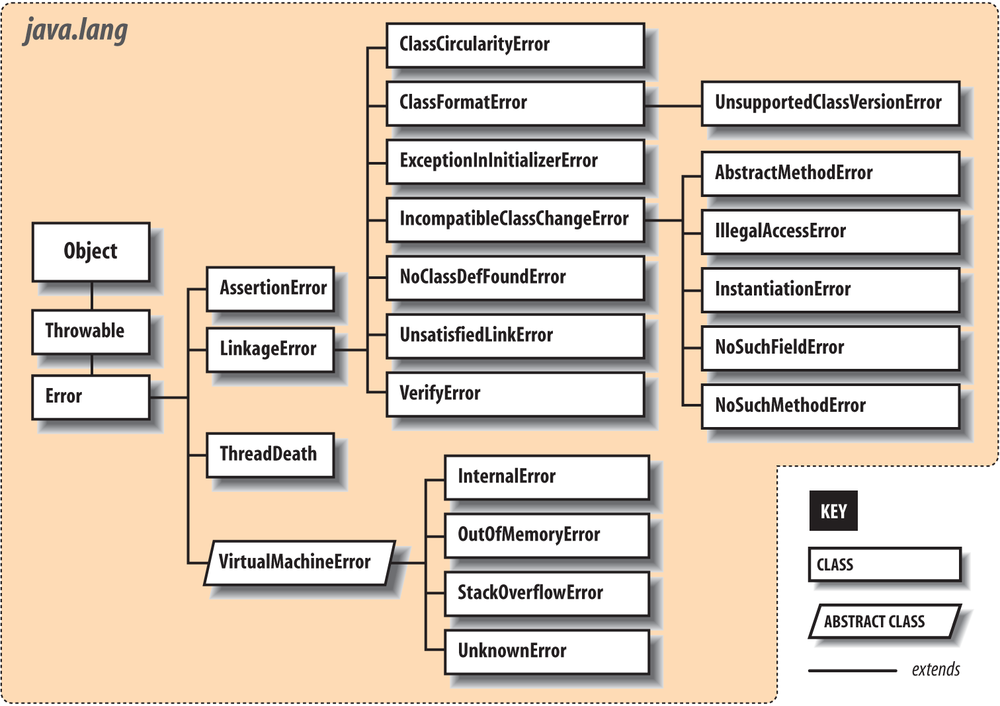
Both Exception and Error are subclasses of Throwable. The Throwable class is the base class for objects
that can be “thrown” with the throw
statement. In general, you should extend only Exception, Error, or one of their subclasses.
The try/catch guarding
statements wrap a block of code and catch designated types of exceptions
that occur within it:
try{readFromFile("foo");...}catch(Exceptione){// Handle errorSystem.out.println("Exception while reading file: "+e);...}
In this example, exceptions that occur within the body of the
try portion of the statement are
directed to the catch clause for
possible handling. The catch clause
acts like a method; it specifies as an argument the type of exception it
wants to handle and if it’s invoked, it receives the Exception object as an argument. Here, we
receive the object in the variable e
and print it along with a message.
A try statement can have
multiple catch clauses that specify
different types (subclasses) of Exception:
try{readFromFile("foo");...}catch(FileNotFoundExceptione){// Handle file not found...}catch(IOExceptione){// Handle read error...}catch(Exceptione){// Handle all other errors...}
The catch clauses are evaluated
in order, and the first assignable match is taken. At most, one catch clause is executed, which means that the
exceptions should be listed from most to least specific. In the previous
example, we anticipate that the hypothetical readFromFile() can throw two different kinds
of exceptions: one for a file not found and another for a more general
read error. In the preceding example, FileNotFoundException is a subclass of
IOException, so if the first catch clause were not there, the exception
would be caught by the second in this case. Similarly, any subclass of
Exception is assignable to the parent
type Exception, so the third catch clause would catch anything passed by
the first two. It acts here like the default clause in a switch statement and handles any remaining
possibilities. We’ve shown it here for completeness, but in general you
want to be as specific as possible in the exception types you
catch.
One beauty of the try/catch
scheme is that any statement in the try block can assume that all previous
statements in the block succeeded. A problem won’t arise suddenly
because a programmer forgot to check the return value from a method. If
an earlier statement fails, execution jumps immediately to the catch clause; later statements are never
executed.
In Java 7, there is an alternative to using multiple catch clauses, and that is to handle multiple
discrete exception types in a single catch clause using the “|” or
syntax:
try{// read from network...// write to file..catch(ZipException|SSLExceptione){logException(e);}
Using this “|” or syntax, we receive both types of exception in
the same catch clause. So, what is
the actual type of the e variable
that we are passing to our log method? (What can we do with it?) In this
case, it will be neither ZipException
nor SSLException but IOException, which is the two exceptions’
nearest common ancestor (the closest parent class type to which they are
both assignable). In many cases, the nearest common type among the two
or more argument exception types may simply be Exception, the parent of all exception types.
The difference between catching these discrete exception types with a
multiple-type catch clause and simply
catching the common parent exception type is that we are limiting our
catch to only these specifically
enumerated exception types and we will not catch all the other IOException types, as would be the alternative
in this case. The combination of multiple-type catch and ordering your catch clauses from most specific to most broad
(“narrow” to “wide”) types gives you great flexibility to structure your
catch clauses to consolidate handling
logic where it is appropriate and to not repeat code. There are more
nuances to this feature, and we will return to it after we have
discussed “throwing” and “rethrowing” exceptions.
What if we hadn’t caught the exception? Where would it
have gone? Well, if there is no enclosing try/catch statement,
the exception pops up from the method in which it originated and is
thrown from that method up to its caller. If that point in the calling
method is within a try clause,
control passes to the corresponding catch clause. Otherwise, the exception
continues propagating up the call stack, from one method to its caller.
In this way, the exception bubbles up until it’s caught, or until it
pops out of the top of the program, terminating it with a runtime error
message. There’s a bit more to it than that because in this case, the
compiler might have forced us to deal with it along the way, but we’ll
get back to that in a moment.
Let’s look at another example. In Figure 4-3, the method getContent() invokes the method openConnection() from within a try/catch statement. In turn, openConnection() invokes the method sendRequest(), which calls the method write() to send some data.
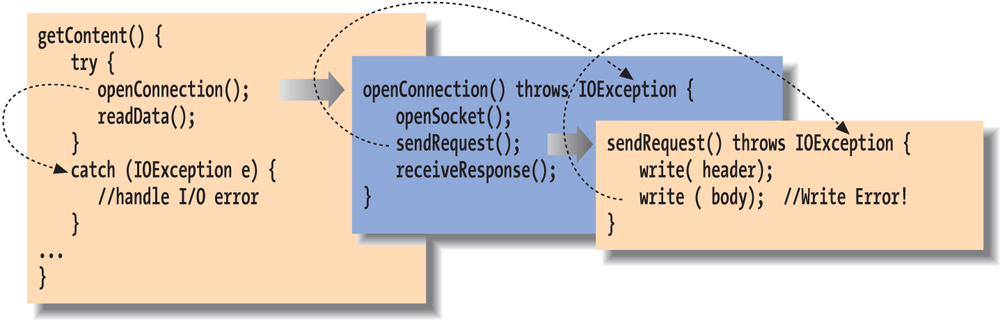
In this figure, the second call to write() throws an IOException. Since sendRequest() doesn’t contain a try/catch statement to handle the exception,
it’s thrown again from the point where it was called in the method
openConnection(). Since openConnection() doesn’t catch the exception
either, it’s thrown once more. Finally, it’s caught by the try statement in getContent() and handled by its catch clause. Notice that each throwing method
must declare with a “throws” clause that it can throw the particular
type of exception. We’ll discuss this shortly.
Because an exception can bubble up quite a distance before
it is caught and handled, we may need a way to determine exactly where
it was thrown. It’s also very important to know the context of how the
point of the exception was reached; that is, which methods called which
methods to get to that point. For these kinds of debugging and logging
purposes, all exceptions can dump a stack trace that lists their method
of origin and all the nested method calls it took to arrive there. Most
commonly, the user sees a stack trace when it is printed using the
printStackTrace()
method.
try{// complex, deeply nested task}catch(Exceptione){// dump information about exactly where the exception occurrede.printStackTrace(System.err);...}
For example, the stack trace for an exception might look like this:
java.io.FileNotFoundException:myfile.xmlatjava.io.FileInputStream.<init>(FileInputStream.java)atjava.io.FileInputStream.<init>(FileInputStream.java)atMyApplication.loadFile(MyApplication.java:137)atMyApplication.main(MyApplication.java:5)
This stack trace indicates that the main() method of the class MyApplication called the method loadFile(). The loadFile() method then tried to construct a
FileInputStream, which threw the
FileNotFoundException. Note that once
the stack trace reaches Java system classes (like FileInputStream), the line numbers may be
lost. This can also happen when the code is optimized by some virtual
machines. Usually, there is a way to disable the optimization
temporarily to find the exact line numbers. However, in tricky
situations, changing the timing of the application can affect the
problem you’re trying to debug, and other debugging techniques may be
required.
Methods on the exception allow you to retrieve the stack
trace information programmatically as well by using the Throwable getStackTrace() method. (Throwable is the base class of Exception and Error.) This method returns an array of
StackTraceElement
objects, each of which represents a method call on the stack. You can
ask a StackTraceElement for details
about that method’s location using the methods getFileName(), getClassName(), getMethodName(), and getLineNumber(). Element zero of the array is
the top of the stack, the final line of code that caused the exception;
subsequent elements step back one method call each until the original
main() method is reached.
We mentioned earlier that Java forces us to be explicit
about our error handling, but it’s not necessary to require that every
conceivable type of error be handled explicitly in every situation. Java
exceptions are therefore divided into two categories:
checked and unchecked. Most
application-level exceptions are checked, which means that any method
that throws one, either by generating it itself (as we’ll discuss later)
or by ignoring one that occurs within it, must declare that it can throw
that type of exception in a special throws clause in its method declaration. We
haven’t yet talked in detail about declaring methods (see Chapter 5). For now, all you need to know is that
methods have to declare the checked exceptions they can throw or allow
to be thrown.
Again in Figure 4-3, notice that
the methods openConnection() and
sendRequest() both specify that they
can throw an IOException. If we had
to throw multiple types of exceptions, we could declare them separated
by commas:
voidreadFile(Strings)throwsIOException,InterruptedException{...}
The throws clause tells the
compiler that a method is a possible source of that type of checked
exception and that anyone calling that method must be prepared to deal
with it. The caller must then either use a try/catch block to handle it, or it must, in
turn, declare that it can throw the exception from itself.
In contrast, exceptions that are subclasses of either the class
java.lang.RuntimeException or the
class java.lang.Error are unchecked.
See Figure 4-1 for the subclasses of
RuntimeException. (Subclasses of
Error are generally reserved for
serious class loading or runtime system problems.) It’s not a
compile-time error to ignore the possibility of these exceptions;
methods also don’t have to declare they can throw them. In all other
respects, unchecked exceptions behave the same as other exceptions. We
are free to catch them if we wish, but in this case we aren’t required
to.
Checked exceptions are intended to cover application-level
problems, such as missing files and unavailable hosts. As good
programmers (and upstanding citizens), we should design software to
recover gracefully from these kinds of conditions. Unchecked exceptions
are intended for system-level problems, such as “out of memory” and
“array index out of bounds.” While these may indicate application-level
programming errors, they can occur almost anywhere and usually aren’t
possible to recover from. Fortunately, because they are unchecked
exceptions, you don’t have to wrap every one of your array-index
operations in a try/catch statement
(or declare all of the calling methods as a potential source of
them).
To sum up, checked exceptions are problems that a reasonable application should try to handle gracefully; unchecked exceptions (runtime exceptions or errors) are problems from which we would not normally expect our software to recover. Error types are those explicitly intended to be conditions that we should not normally try to handle or recover from.
We can throw our own exceptions—either instances of
Exception, one of its existing
subclasses, or our own specialized exception classes. All we have to do
is create an instance of the Exception and throw it with the throw statement:
thrownewIOException();
Execution stops and is transferred to the nearest enclosing
try/catch statement that can handle
the exception type. (There is little point in keeping a reference to the
Exception object we’ve created here.)
An alternative constructor lets us specify a string with an error
message:
thrownewIOException("Sunspots!");
You can retrieve this string by using the Exception object’s
getMessage() method.
Often, though, you can just print (or toString()) the exception object itself to get
the message and stack trace.
By convention, all types of Exception have a String constructor like this. The preceding
String message is not very useful.
Normally, it will throw a more specific subclass Exception, which captures details or at least
a more specific string explanation. Here’s another example:
publicvoidcheckRead(Strings){if(newFile(s).isAbsolute()||(s.indexOf("..")!=-1))thrownewSecurityException("Access to file : "+s+" denied.");}
In this code, we partially implement a method to check for an
illegal path. If we find one, we throw a SecurityException with
some information about the transgression.
Of course, we could include any other information that is useful
in our own specialized subclasses of Exception. Often, though, just having a new
type of exception is good enough because it’s sufficient to help direct
the flow of control. For example, if we are building a parser, we might
want to make our own kind of exception to indicate a particular kind of
failure:
classParseExceptionextendsException{ParseException(){super();}ParseException(Stringdesc){super(desc);}}
See Chapter 5 for a full description of
classes and class constructors. The body of our Exception class here simply allows a
ParseException to be
created in the conventional ways we’ve created exceptions previously
(either generically or with a simple string description). Now that we
have our new exception type, we can guard like this:
// Somewhere in our code...try{parseStream(input);}catch(ParseExceptionpe){// Bad input...}catch(IOExceptionioe){// Low-level communications problem}
As you can see, although our new exception doesn’t currently hold any specialized information about the problem (it certainly could), it does let us distinguish a parse error from an arbitrary I/O error in the same chunk of code.
Sometimes you’ll want to take some action based on an
exception and then turn around and throw a new exception in its place.
This is common when building frameworks where low-level detailed
exceptions are handled and represented by higher-level exceptions that
can be managed more easily. For example, you might want to catch an
IOException in a communications
package, possibly perform some cleanup, and ultimately throw a higher-level
exception of your own, maybe something like LostServerConnection.
You can do this in the obvious way by simply catching the
exception and then throwing a new one, but then you lose important
information, including the stack trace of the original “causal”
exception. To deal with this, you can use the technique of
exception chaining. This means that you include
the causal exception in the new exception that you throw. Java has
explicit support for exception chaining. The base Exception class can be constructed with an
exception as an argument or the standard String message and an exception:
thrownewException("Here's the story...",causalException);
You can get access to the wrapped exception later with the
getCause() method.
More importantly, Java automatically prints both exceptions and their
respective stack traces if you print the exception or if it is shown
to the user.
You can add this kind of constructor to your own exception
subclasses (delegating to the parent constructor) or you can take
advantage of this pattern by using the Throwable method
initCause() to set
the causal exception explicitly after constructing your exception and
before throwing it:
try{// ...}catch(IOExceptioncause){Exceptione=newIOException("What we have here is a failure to communicate...");e.initCause(cause);throwe;}
Sometimes it’s enough to simply do some logging or take some action and then rethrow the original exception:
try{// ...}catch(IOExceptioncause){log(e);// Log itthrowe;// rethrow it}
But be aware that if you do that, the stack trace included in the exception will show the new throw location as the origin.
Prior to Java 7 if you wanted to handle a bunch of exception
types in a single catch clause and
then rethrow the original exception, you would inevitably end up
widening the declared exception type to what was required to catch
them all or having to do a lot of work to avoid that. In Java 7, the
compiler has become smarter and can now do most of the work for us by
allowing us to narrow the type of exceptions thrown back to the
original types in most cases. This is best explained by
example:
voidmyMethod()throwsZipException,SSLException{try{// Possible cause of ZipException or SSLException}catch(Exceptione){log(e);throwe;}}
In this example, we are exceedingly lazy and simply catch
all exceptions with a broad catch Exception clause in order to log them prior
to rethrowing. Prior to Java 7, the compiler would have insisted that
the throws clause of our method
declare that it throws the broad Exception type as well. However, the Java
compiler is now smart enough in most cases to analyze the actual types
of exceptions that may be thrown and allow us to prescribe the precise
set of types. The same would be true if we had used the mutiple-type
catch clause in this example, as
you might have guessed. The preceding is a bit less intuitive, but
very useful in shoring up the specificity of exception handling of
code, including code written prior to Java 7, without requiring
potentially tricky reworking of catch clauses.
The try statement
imposes a condition on the statements that it guards. It says that if an
exception occurs within it, the remaining statements are abandoned. This
has consequences for local variable initialization. If the compiler
can’t determine whether a local variable assignment placed inside a
try/catch block will happen, it won’t
let us use the variable. For example:
voidmyMethod(){intfoo;try{foo=getResults();}catch(Exceptione){...}intbar=foo;// Compile-time error: foo may not have been initialized
In this example, we can’t use foo in the indicated place because there’s a
chance it was never assigned a value. One obvious option is to move the
assignment inside the try
statement:
try{foo=getResults();intbar=foo;// Okay because we get here only// if previous assignment succeeds}catch(Exceptione){...}
Sometimes this works just fine. However, now we have the same
problem if we want to use bar later
in myMethod(). If we’re not careful,
we might end up pulling everything into the try statement. The situation changes, however,
if we transfer control out of the method in the catch clause:
try{foo=getResults();}catch(Exceptione){...return;}intbar=foo;// Okay because we get here only// if previous assignment succeeds
The compiler is smart enough to know that if an error had occurred
in the try clause, we wouldn’t have
reached the bar assignment, so it
allows us to refer to foo. Your code
will dictate its own needs; you should just be aware of the
options.
What if we have something important to do before we exit
our method from one of the catch
clauses? To avoid duplicating the code in each catch branch and to
make the cleanup more explicit, you can use the finally clause. A finally clause can be added after a try and any associated catch clauses. Any statements in the body of
the finally clause are guaranteed to
be executed no matter how control leaves the try body, whether an exception was thrown or
not:
try{// Do something here}catch(FileNotFoundExceptione){...}catch(IOExceptione){...}catch(Exceptione){...}finally{// Cleanup here is always executed}
In this example, the statements at the cleanup point are executed
eventually, no matter how control leaves the try. If control transfers to one of the
catch clauses, the statements in
finally are executed after the
catch completes. If none of the
catch clauses handles the exception,
the finally statements are executed
before the exception propagates to the next level.
If the statements in the try
execute cleanly, or if we perform a return , break, or continue, the
statements in the finally clause are
still executed. To guarantee that some operations will run, we can even
use try and finally without any catch clauses:
try{// Do something herereturn;}finally{System.out.println("Whoo-hoo!");}
Exceptions that occur in a catch or finally clause are handled normally; the
search for an enclosing try/catch
begins outside the offending try
statement, after the finally has been
executed.
A common use of the finally clause is to ensure that resources
used in a try clause are cleaned up,
no matter how the code exits the block.
try{// Socket sock = new Socket(...);// work with sock}catch(IOExceptione){...}finally{if(sock!=null){sock.close();}}
What we mean by “clean up” here is to deallocate
expensive resources or close connections such as files, sockets, or
database connections. In some cases, these resources might get cleaned
up on their own eventually as Java reclaimed the garbage, but that would
at best be at an unknown time in the future and at worst may never
happen or may not happen before you run out of resources. So it is
always best to guard against these situations. There are two problems
with this venerable approach: first, it requires extra work to carry out
this pattern in all of your code, including important things like null
checks as shown in our example, and second, if you are juggling multiple
resources in a single finally block,
you have the possibility of your cleanup code throwing an exception
(e.g., on close()) and leaving the
job unfinished.
In Java 7, things have been greatly simplified via the new
“try with resources” form of the
try clause. In this form, you may
place one or more resource initialization statements within parentheses
after a try keyword and those
resources will automatically be “closed” for you when control leaves the
try block.
try(Socketsock=newSocket("128.252.120.1",80);FileWriterfile=newFileWriter("foo");){// work with sock and file}catch(IOExceptione){...}
In this example, we initialize both a Socket object and a FileWriter object within the try-with-resources clause and use them within
the body of the try statement. When
control leaves the try statement,
either after successful completion or via an exception, both resources
are automatically closed by calling their close() method. Resources are closed in the
reverse of the order in which they were
constructed, so dependencies among them can be accommodated. This
behavior is supported for any class that implements the AutoCloseable interface
(which, at current count, over 100 different built-in classes do). The
close() method of this interface is
prescribed to release all resources associated with the object, and you
can implement this easily in your own classes as well. When using
try with resources, we don’t have to
add any code specifically to close the file or socket; it is done for us
automatically.
Another problem that try with
resources solves is the pesky situation we alluded to where an exception
may be thrown during a close operation. Looking back to the prior
example in which we used a finally
clause to do our cleanup, if an exception had been raised by the
close() method, it would have been
thrown at that point, completely abandoning the original exception from
the body of the try clause. But in
using try with resources, we preserve
the original exception. If an exception occurs while within the body of
the try and one or more exceptions is
raised during the subsequent auto-closing operations, it is the original
exception from the body of the try
that is bubbled up to the caller. Let’s look at an
example:
try(Socketsock=newSocket("128.252.120.1",80);// potential exception #3FileWriterfile=newFileWriter("foo");// potential exception #2){// work with sock and file // potential exception #1}
Once the try has begun, if an
exception occurs as exception point #1, Java will attempt to close both
resources in reverse order, leading to potential exceptions at locations
#2 and #3. In this case, the calling code will still receive exception
#1. Exceptions #2 and #3 are not lost, however; they are merely
“suppressed” and can be retrieved via the Throwable getSuppressed() method of the
exception thrown to the caller. This returns an array of all of the
supressed exceptions.
Because of the way the Java virtual machine is
implemented, guarding against an exception being thrown (using a
try) is free. It doesn’t add any
overhead to the execution of your code. However, throwing an exception
is not free. When an exception is thrown, Java has to locate the
appropriate try/catch block and
perform other time-consuming activities at runtime.
The result is that you should throw exceptions only in truly “exceptional” circumstances and avoid using them for expected conditions, especially when performance is an issue. For example, if you have a loop, it may be better to perform a small test on each pass and avoid throwing the exception rather than throwing it frequently. On the other hand, if the exception is thrown only once in a gazillion times, you may want to eliminate the overhead of the test code and not worry about the cost of throwing that exception. The general rule should be that exceptions are used for “out of bounds” or abnormal situations, not routine and expected conditions (such as the end of a file).
[9] The somewhat obscure setjmp() and
longjmp() statements
in C can save a point in the execution of code and later return to it
unconditionally from a deeply buried location. In a limited sense,
this is the functionality of exceptions in Java.
[10] For example, the getHeight()
method of the Image class returns
-1 if the height isn’t known yet.
No error has occurred; the height will be available in the future. In
this situation, throwing an exception would be inappropriate.