An array is a special type of object that can hold an ordered collection of elements. The type of the elements of the array is called the base type of the array; the number of elements it holds is a fixed attribute called its length. Java supports arrays of all primitive and reference types.
The basic syntax of arrays looks much like that of C or C++. We
create an array of a specified length and access the elements with the
index operator, []. Unlike other
languages, however, arrays in Java are true, first-class objects. An array
is an instance of a special Java array class and has a
corresponding type in the type system. This means that to use an array, as
with any other object, we first declare a variable of the appropriate type
and then use the new operator to create
an instance of it.
Array objects differ from other objects in Java in three respects:
Java implicitly creates a special array class type for us whenever we declare a new type of array. It’s not strictly necessary to know about this process in order to use arrays, but it helps in understanding their structure and their relationship to other objects in Java later.
Java lets us use the
[]operator to access array elements so that arrays look as we expect. We could implement our own classes that act like arrays, but we would have to settle for having methods such asget()andset()instead of using the special[]notation.Java provides a corresponding special form of the
newoperator that lets us construct an instance of an array with a specified length with the[]notation or initialize it directly from a structured list of values.
An array type variable is denoted by a base type followed
by the empty brackets, [].
Alternatively, Java accepts a C-style declaration with the brackets
placed after the array name.
The following are equivalent:
int[]arrayOfInts;// preferredintarrayOfInts[];// C-style
In each case, arrayOfInts is
declared as an array of integers. The size of the array is not yet an
issue because we are declaring only the array type variable. We have not
yet created an actual instance of the array class, with its associated storage. It’s
not even possible to specify the length of an array when declaring an
array type variable. The size is strictly a function of the array object
itself, not the reference to it.
An array of reference types can be created in the same way:
String[]someStrings;Button[]someButtons;
The new operator is used to
create an instance of an array. After the new operator, we specify the base type of the
array and its length with a bracketed integer expression:
arrayOfInts=newint[42];someStrings=newString[number+2];
We can, of course, combine the steps of declaring and allocating the array:
double[]someNumbers=newdouble[20];Component[]widgets=newComponent[12];
Array indices start with zero. Thus, the first element of someNumbers[] is 0, and the last element is 19. After creation, the array elements are
initialized to the default values for their type. For numeric types,
this means the elements are initially zero:
int[]grades=newint[30];grades[0]=99;grades[1]=72;// grades[2] == 0
The elements of an array of objects are references to the
objects—just like individual variables they point to—but do not actually
contain instances of the objects. The default value of each element is
therefore null until we assign
instances of appropriate objects:
Stringnames[]=newString[4];names[0]=newString();names[1]="Boofa";names[2]=someObject.toString();// names[3] == null
This is an important distinction that can cause confusion. In many
other languages, the act of creating an array is the same as allocating
storage for its elements. In Java, a newly allocated array of objects
actually contains only reference variables, each with the value null.[11] That’s not to say that there is no memory associated with
an empty array; memory is needed to hold those references (the empty
“slots” in the array). Figure 4-4
illustrates the names array of the
previous example.
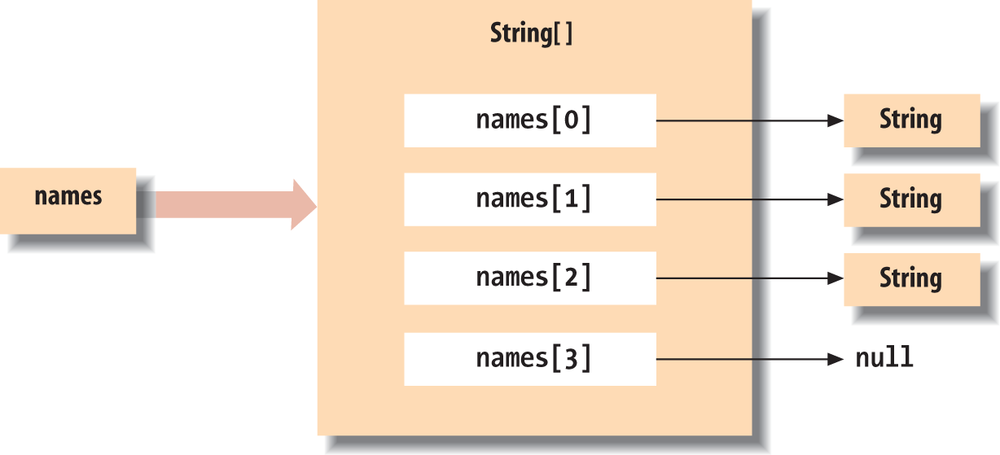
names is a variable of type
String[] (i.e., a string array). This
particular String[] object contains
four String type variables. We have
assigned String objects to the first
three array elements. The fourth has the default value null.
Java supports the C-style curly braces {} construct for
creating an array and initializing its elements:
int[]primes={2,3,5,7,7+4};// e.g., primes[2] = 5
An array object of the proper type and length is implicitly
created, and the values of the comma-separated list of expressions are
assigned to its elements. Note that we did not use the new keyword or the array type here. The type
of the array was inferred from the assignment.
We can use the {} syntax with an array
of objects. In this case, each expression must evaluate to an object
that can be assigned to a variable of the base type of the array or the
value null. Here are some
examples:
String[]verbs={"run","jump",someWord.toString()};Button[]controls={stopButton,newButton("Forwards"),newButton("Backwards")};// All types are subtypes of ObjectObject[]objects={stopButton,"A word",null};
Button[]threeButtons=newButton[3];Button[]threeButtons={null,null,null};
The size of an array object is available in the public
variable length:
char[]alphabet=newchar[26];intalphaLen=alphabet.length;// alphaLen == 26String[]musketeers={"one","two","three"};intnum=musketeers.length;// num == 3
length is the only
accessible field of an array; it is a variable, not a method. (Don’t
worry; the compiler tells you when you accidentally use parentheses as
if it were a method, as everyone does now and then.)
Array access in Java is just like array access in other languages;
you access an element by putting an integer-valued expression between
brackets after the name of the array. The following example creates an
array of Button objects called
keyPad and then fills the array with
Button objects:
Button[]keyPad=newButton[10];for(inti=0;i<keyPad.length;i++)keyPad[i]=newButton(Integer.toString(i));
Remember that we can also use the enhanced for loop to iterate over array values. Here
we’ll use it to print all the values we just assigned:
for(Buttonb:keyPad)System.out.println(b);
Attempting to access an element that is outside the range of the
array generates an ArrayIndexOutOfBoundsException. This is a type
of RuntimeException, so you can
either catch and handle it yourself if you really expect it, or ignore
it, as we’ve already discussed:
String[]states=newString[50];try{states[0]="California";states[1]="Oregon";...states[50]="McDonald's Land";// Error: array out of bounds}catch(ArrayIndexOutOfBoundsExceptionerr){System.out.println("Handled error: "+err.getMessage());}
It’s a common task to copy a range of elements from one array into
another. One way to copy arrays is to use the low-level arraycopy() method of
the System class:
System.arraycopy(source,sourceStart,destination,destStart,length);
The following example doubles the size of the names array from an earlier example:
String[]tmpVar=newString[2*names.length];System.arraycopy(names,0,tmpVar,0,names.length);names=tmpVar;
A new array, twice the size of names, is allocated and assigned to a
temporary variable, tmpVar. The
arraycopy() method is then used to
copy the elements of names to the new
array. Finally, the new array is assigned to names. If there are no remaining references to
the old array object after names has
been copied, it is garbage-collected on the next pass.
An easier way is to use the java.util.ArrayscopyOf() and copyOfRange()
methods:
byte[]bar=newbyte[]{1,2,3,4,5};byte[]barCopy=Arrays.copyOf(bar,bar.length);// { 1, 2, 3, 4, 5 }byte[]expanded=Arrays.copyOf(bar,bar.length+2);// { 1, 2, 3, 4, 5, 0, 0 }byte[]firstThree=Arrays.copyOfRange(bar,0,3);// { 1, 2, 3 }byte[]lastThree=Arrays.copyOfRange(bar,2,bar.length);// { 3, 4, 5 }byte[]lastThreePlusTwo=Arrays.copyOfRange(bar,2,bar.length+2);// { 3, 4, 5, 0, 0 }
The copyOf() method takes the
original array and a target length. If the target length is larger than
the original array length, then the new array is padded (with zeros or
nulls) to the desired length. The copyOfRange() takes a starting index
(inclusive) and an ending index (exclusive) and a desired length, which
will also be padded if necessary.
Often it is convenient to create “throwaway” arrays, arrays that are used in one place and never referenced anywhere else. Such arrays don’t need a name because you never need to refer to them again in that context. For example, you may want to create a collection of objects to pass as an argument to some method. It’s easy enough to create a normal, named array, but if you don’t actually work with the array (if you use the array only as a holder for some collection), you shouldn’t need to do this. Java makes it easy to create “anonymous” (i.e., unnamed) arrays.
Let’s say you need to call a method named setPets(), which takes an array of Animal objects as arguments. Provided Cat and Dog
are subclasses of Animal, here’s how
to call setPets() using an anonymous
array:
Dogpokey=newDog("gray");Catboojum=newCat("grey");Catsimon=newCat("orange");setPets(newAnimal[]{pokey,boojum,simon});
The syntax looks similar to the initialization of an array in a
variable declaration. We implicitly define the size of the array and
fill in its elements using the curly-brace notation. However, because
this is not a variable declaration, we have to explicitly use the
new operator and the array type to
create the array object.
Anonymous arrays were sometimes used as a substitute for variable-length argument lists to methods, which are discussed in Chapter 5. With the introduction of variable-length argument lists in Java, the usefulness of anonymous arrays has diminished.
Java supports multidimensional arrays in the form of arrays of array type objects. You create a multidimensional array with C-like syntax, using multiple bracket pairs, one for each dimension. You also use this syntax to access elements at various positions within the array. Here’s an example of a multidimensional array that represents a chess board:
ChessPiece[][]chessBoard;chessBoard=newChessPiece[8][8];chessBoard[0][0]=newChessPiece.Rook;chessBoard[1][0]=newChessPiece.Pawn;...
Here, chessBoard is declared as
a variable of type ChessPiece[][]
(i.e., an array of ChessPiece
arrays). This declaration implicitly creates the type ChessPiece[] as well. The example illustrates the special
form of the new operator used to
create a multidimensional array.
It creates an array of ChessPiece[]
objects and then, in turn, makes each element into an array of ChessPiece objects. We then index chessBoard to specify values for particular
ChessPiece elements. (We’ll neglect
the color of the pieces here.)
Of course, you can create arrays with more than two dimensions. Here’s a slightly impractical example:
Color[][][]rgbCube=newColor[256][256][256];rgbCube[0][0][0]=Color.black;rgbCube[255][255][0]=Color.yellow;...
We can specify a partial index of a multidimensional array to get
a subarray of array type objects with fewer dimensions. In our example,
the variable chessBoard is of type
ChessPiece[][]. The expression
chessBoard[0] is valid and refers to
the first element of chessBoard,
which, in Java, is of type ChessPiece[]. For example, we can populate our
chess board one row at a time:
ChessPiece[]homeRow={newChessPiece("Rook"),newChessPiece("Knight"),newChessPiece("Bishop"),newChessPiece("King"),newChessPiece("Queen"),newChessPiece("Bishop"),newChessPiece("Knight"),newChessPiece("Rook")};chessBoard[0]=homeRow;
We don’t necessarily have to specify the dimension sizes of a
multidimensional array with a single new operation. The
syntax of the new operator lets us
leave the sizes of some dimensions unspecified. The size of at least the
first dimension (the most significant dimension of the array) has to be
specified, but the sizes of any number of trailing, less significant
array dimensions may be left undefined. We can assign appropriate
array-type values later.
We can create a checkerboard of Boolean values (which is not quite sufficient for a real game of checkers either) using this technique:
boolean[][]checkerBoard;checkerBoard=newboolean[8][];
Here, checkerBoard is declared
and created, but its elements, the eight boolean[] objects of the next level, are left
empty. Thus, for example, checkerBoard[0] is null until we explicitly create an array and
assign it, as follows:
checkerBoard[0]=newboolean[8];checkerBoard[1]=newboolean[8];...checkerBoard[7]=newboolean[8];
The code of the previous two examples is equivalent to:
boolean[][]checkerBoard=newboolean[8][8];
One reason we might want to leave dimensions of an array unspecified is so that we can store arrays given to us by another method.
Note that because the length of the array is not part of its type, the arrays in the checkerboard do not necessarily have to be of the same length; that is, multidimensional arrays don’t have to be rectangular. Here’s a defective (but perfectly legal in Java) checkerboard:
checkerBoard[2]=newboolean[3];checkerBoard[3]=newboolean[10];
And here’s how you could create and initialize a triangular array:
int[][]triangle=newint[5][];for(inti=0;i<triangle.length;i++){triangle[i]=newint[i+1];for(intj=0;j<i+1;j++)triangle[i][j]=i+j;}
We said earlier that arrays are instances of special array classes in the Java language. If arrays have classes, where do they fit into the class hierarchy and how are they related? These are good questions, but we need to talk more about the object-oriented aspects of Java before answering them. That’s the subject of the next chapter. For now, take it on faith that arrays fit into the class hierarchy.
[11] The analog in C or C++ is an array of pointers to objects. However, pointers in C or C++ are themselves two- or four-byte values. Allocating an array of pointers is, in actuality, allocating the storage for some number of those pointer objects. An array of references is conceptually similar, although references are not themselves objects. We can’t manipulate references or parts of references other than by assignment, and their storage requirements (or lack thereof) are not part of the high-level Java language specification.