Collections are data structures that
are fundamental to all types of programming. Whenever we need to refer to
a group of objects, we have some kind of collection. At the core language
level, Java supports collections in the form of arrays. But arrays are
static and because they have a fixed length, they are awkward for groups
of things that grow and shrink over the lifetime of an application. Arrays
also do not represent abstract relationships between objects well. In the
early days, the Java platform had only two basic classes to address these
needs: the java.util.Vector class,
which represents a dynamic list of objects, and the java.util.Hashtable class, which holds a map of
key/value pairs. Today, Java has a more comprehensive approach to
collections called the Collections Framework. The older classes still
exist, but they have been retrofitted into the framework (with some
eccentricities) and are generally no longer used.
Though conceptually simple, collections are one of the most powerful parts of any programming language. Collections implement data structures that lie at the heart of managing complex problems. A great deal of basic computer science is devoted to describing the most efficient ways to implement certain types of algorithms over collections. Having these tools at your disposal and understanding how to use them can make your code both much smaller and faster. It can also save you from reinventing the wheel.
Prior to Java 5, the Collections Framework had two major drawbacks.
The first was that—not having generic types to work with—collections were
by necessity untyped and worked only with anonymous Objects instead of real types like Dates and Strings. This meant that you had to perform a
type cast every time you took an object out of a collection. This flew in
the face of Java’s compile-time type safety. But in practice, this was
less a problem than it was just plain cumbersome and tedious. The second
issue was that, for practical reasons, collections could work only with
objects and not with primitive types. This meant that any time you wanted
to put a number or other primitive type into a collection, you had to
store it in a wrapper class first and unpack it later upon retrieving it.
The combination of these factors made code working with collections less
readable and more dangerous to boot.
This all changed with the introduction of generic types and autoboxing of primitive values. First, the introduction of generic types, as we described in Chapter 8, has made it possible for truly typesafe collections to be under the control of the programmer. Second, the introduction of autoboxing and unboxing of primitive types means that you can generally treat objects and primitives as equals where collections are concerned. The combination of these new features can significantly reduce the amount of code you write and add safety as well. As we’ll see, all of the collections classes now take advantage of these features.
The Collections Framework is based around a handful of interfaces in
the java.util package. These interfaces
are divided into two hierarchies. The first hierarchy descends from the
Collection interface. This interface
(and its descendants) represents a container that holds other objects. The
second, separate hierarchy is based on the Map interface, which represents a group of
key/value pairs where the key can be used to retrieve the value in an
efficient way.
The mother of all collections is an interface
appropriately named Collection. It
serves as a container that holds other objects, its
elements. It doesn’t specify exactly how the
objects are organized; it doesn’t say, for example, whether duplicate
objects are allowed or whether the objects are ordered in any way. These
kinds of details are left to child interfaces. Nevertheless, the
Collection interface defines some
basic operations common to all collections:
public boolean add(element)This method adds the supplied object to this collection. If the operation succeeds, this method returns
true. If the object already exists in this collection and the collection does not permit duplicates,falseis returned. Furthermore, some collections are read-only. Those collections throw anUnsupportedOperationExceptionif this method is called.public boolean remove(element)This method removes the specified object from this collection. Like the
add()method, this method returnstrueif the object is removed from the collection. If the object doesn’t exist in this collection,falseis returned. Read-only collections throw anUnsupportedOperationExceptionif this method is called.public boolean contains(element)This method returns
trueif the collection contains the specified object.public int size()Use this method to find the number of elements in this collection.
public boolean
          isEmpty()
This method returns
trueif this collection has no elements.public Iterator iterator()Use this method to examine all the elements in this collection. This method returns an
Iterator, which is an object you can use to step through the collection’s elements. We’ll talk more about iterators in the next section.
Additionally, the methods addAll(), removeAll(), and
containsAll() accept
another Collection and add, remove,
or test for all of the elements of the supplied collection.
When using generics, the Collection type is parameterized with a
specific type of element that the collection will hold. This makes a
generic collection of “anything” into a specific collection of some
type of element. The parameter type becomes the compile-time type of
the element arguments in all of the
methods of Collection (in this
case, the add(), remove(), and contains() methods listed earlier). For
example, in the following code, we create a Collection that works with Dates:
Collection<Date>dates=newArrayList<Date>();// = new ArrayList<>() would// also work.dates.add(newDate());dates.add("foo")// Error; string type where Date expected!!
ArrayList is just one
implementation of Collection; we’ll
talk about it a bit later. The important thing is that we’ve declared
the variable dates to be of the
type Collection<Date>; that
is, a collection of Dates, and
we’ve allocated our ArrayList to
match. Because our collection has been parameterized with the type
Date, the add() method of the collection becomes
add( Date date ) and attempting to
add any type of object other than a Date to the list would have caused a
compile-time error.
If you are working with very old Java code that predates generics, you can simply drop the types and perform the appropriate casts. For example:
Collectiondates=newArrayList();dates.add(newDate());// unchecked, compile-time warningDatedate=(Date)dates.get(0);
In this case, we’ll get a compile time warning that we’re using
ArrayList in a potentially unsafe
(nongeneric typesafe) way.
As we’ve described earlier in the book, this is essentially what the Java compiler is doing for us with generics. When using collections (or any generic classes) in this way under Java 5 or later, you will get compile-time warnings indicating that the usage is unchecked, meaning that it is possible to get an error at runtime if you have made a mistake. In this example, a mistake would not be caught until someone tried to retrieve the object from the collection and cast it to the expected type.
If you are working with legacy Java code that predates
Java 5 generics and you do not wish to introduce generics to it, you
can still add a layer of type safety at runtime by switching to a
runtime type-checked version of your collection types. Java supplies
runtime-checked wrappers for all of the basic collection types. These
wrappers enforce a specific Java element type at runtime by throwing
ClassCastException if
the wrong element is inserted. For example:
Listlist=newArrayList();list=Collections.checkedList(list,Date.class);list.add(newDate());list.add("foo");// Runtime ClassCastException!
Here, the static Collections.checkedList() method has wrapped
our collection, list, in a wrapper
that implements all of the methods of List, but checks that we are only holding
Dates. The second argument to the
method is the literal Date.class
reference to the Class of Date. This serves to tell the wrapper what
type we want to enforce. Corresponding “checked” collection methods
exist for all of the basic collection interfaces that we’ll see,
including the base Collection,
List, Set, and Map.
Converting between collections and arrays is easy. For convenience, the elements of a collection can be retrieved as an array using the following methods:
publicObject[]toArray()public<E>E[]toArray(E[]a)
The first method returns a plain Object array. With the second form, we can
be more specific and get back an array of the correct element type. If
we supply an array of sufficient size, it will be filled in with the
values. But if the array is too short (e.g., zero length), a new array
of the same type but the required length will be
created and returned to us. So you can just pass in an empty array of
the correct type like this:
Collection<String>myCollection=...;String[]myStrings=myCollection.toArray(newString[0]);
(This trick is a little awkward and it would be nice if Java let
us specify the type explicitly using a Class reference, but for some reason, this
isn’t the case.) Going the other way, you can convert an array of
objects to a List collection with
the static asList() method of the
java.util.Arrays class:
String[]myStrings=...;Listlist=Arrays.asList(myStrings);
An iterator is an object that lets you
step through a sequence of values. This kind of operation comes up so
often that it is given a standard interface: java.util.Iterator. The Iterator interface has
only two primary methods:
public E next()This method returns the next element (an element of generic type E) of the associated collection.
public boolean
          hasNext()
This method returns
trueif you have not yet stepped through all theCollection’s elements. In other words, it returnstrueif you can callnext()to get the next element.
The following example shows how you could use an Iterator to print out every element of a
collection:
publicvoidprintElements(Collectionc,PrintStreamout){Iteratoriterator=c.iterator();while(iterator.hasNext())out.println(iterator.next());}
In addition to the traversal methods, Iterator provides the ability to remove an
element from a collection:
Not all iterators implement remove(). It doesn’t make sense to be able to
remove an element from a read-only collection, for example. If element
removal is not allowed, an UnsupportedOperationException is thrown from
this method. If you call remove()
before first calling next(), or if
you call remove() twice in a row,
you’ll get an IllegalStateException.
A form of the for
loop, described in Chapter 4, can operate
over all types of Collection objects.
For example, we can now step over all of the elements of a typed
collection of Date objects like
so:
Collection<Date>col=...for(Datedate:col)System.out.println(date);
This feature of the Java built-in for loop is called the “enhanced” for loop (as opposed to the pregenerics,
numeric-only for loop). The
enhanced for loop applies only to
Collection type collections, not
Maps. Maps are another type of beast that really
contain two distinct sets of objects (keys and values), so it’s not
obvious what your intentions would be in such a loop.
Prior to the introduction of the Collections API there
was another iterator interface: java.util.Enumeration. It used the slightly
more verbose names nextElement() and
hasMoreElements(),
but accomplished the same thing. Many older classes provide Enumerations where
they would now use Iterator. If you
aren’t worried about performance, you can just convert your Enumeration into a List with a static convenience method of the
java.util.Collections
class:
EnumerationmyEnumeartion=...;Listlist=Collections.list(myEnumeration);
The Collection
interface has three child interfaces. Set represents a collection in which duplicate
elements are not allowed. List is a
collection whose elements have a specific order. The Queue interface is a buffer for objects with a
notion of a “head” element that’s next in line for processing.
Set has no methods
besides the ones it inherits from Collection. It simply enforces its
no-duplicates rule. If you try to add an element that already exists
in a Set, the add() method simply returns false. SortedSet maintains elements in a prescribed
order; like a sorted list that can contain no duplicates. It adds the
methods add() and remove() to the Set
interface. You can retrieve subsets (which are also sorted)
using the subSet(), headSet(), and
tailSet() methods.
These methods accept one or a pair of elements that mark the
boundaries. The first(), last(), and
comparator() methods
provide access to the first element, the last element, and the object
used to compare elements (more on this later).
Java 7 adds NavigableSet,
which extends SortedSet and adds
methods for finding the closest match greater or lesser than a target
value within the sort order of the Set. This interface can be implemented
efficiently using techniques such as skip lists, which make finding
ordered elements fast (Java 7 supplies such an implementation, which
we’ll note later).
The next child interface of Collection is List. The List is an ordered collection, similar to an
array but with methods for manipulating the position of elements in
the list:
public boolean add( Eelement)This method adds the specified element to the end of the list.
public void add( intindex, Eelement)This method inserts the given object at the supplied position in the list. If the position is less than zero or greater than the list length, an
IndexOutOfBoundsExceptionwill be thrown. The element that was previously at the supplied position, and all elements after it, are moved up one index position.public void remove( intindex)This method removes the element at the specified position. All subsequent elements move down one index position.
public E get( intindex)public Object set( intindex, Eelement)This method changes the element at the given position to the specified object. There must already be an object at the index or else an
IndexOutOfBoundsExceptionis thrown.
The type E in these methods
refers to the parameterized element type of the List class. Collection, Set, and List are all interface types. We’ll look at
concrete implementations of these shortly.
A Queue is a collection
that acts like a buffer for elements. The queue maintains the
insertion order of items placed into it and has the notion of a “head”
item. Queues may be first in, first out (FIFO) or last in, first out
(LIFO) depending on the implementation:
public boolean offer( E element
            )
public boolean add( E element )The
offer()method attempts to place the element into the queue, returning true if successful. DifferentQueuetypes may have different limits or restrictions on element types (including capacity). This method differs from theadd()method inherited fromCollectionin that it returns a Boolean value instead of throwing an exception to indicate that the element cannot be accepted.public Epoll()public E remove()The
poll()method removes the element at the head of the queue and returns it. This method differs from theCollectionmethodremove()in that if the queue is empty,nullis returned instead of throwing an exception.public Epeek()This method returns the head element without removing it from the queue. If the queue is empty,
nullis returned.
Java 7 added Deque, which is a
“double-ended” queue that supports adding, querying, and removing
elements from either end of the queue (the head or the tail). Dequeue has versions of the queue
methods—offer, poll, and peek—that operate on the first or last
element: offerFirst(),
pollFirst(),
peekFirst(),
offerLast(),
pollLast(),
peekLast(). Note that
Deque extends Queue and so is still a type of Queue. If you use the plain Queue methods offer(), poll(), and
peek() on a Deque, they operate as a FIFO queue.
Specifically, calling offer() is
equivalent to offerLast() and
calling poll() or peek() is the same as calling pollFirst() or peekFirst(), respectively.
Finally, Java has a legacy Stack class that acts
as a LIFO queue with “push” and “pop” operations, but Deque is generally better and should serve
as a general replacement for Stack.
Simply use addFirst() for “push”
and pollFirst() for “pop.”
BlockingQueue is
part of the java.util.concurrent
package. It extends the Queue
interface for queues that may have a fixed capacity or other
time-based limitations and allows the user to block, waiting for
insertion of an item or for an available item to retrieve. It adds
timed wait versions of offer() and
poll() and
additional, blocking take() and put() methods:
public boolean offer( E element, long time, TimeUnit units )This method attempts to place the element into the queue, just like the method of the base
Queueinterface, but blocks for up to the specified period of time as it waits for space to become available.public E poll( long time, timeUnit unit )This method attempts to remove the element at the head of the queue, just like the method of the base
Queueinterface, but blocks for up to the specified period of time as it waits for an element to become available.public E take()This method retrieves the element at the head of the queue, blocking if necessary until one becomes available.
public void put( E element )This method adds an element to the queue, blocking if necessary until space becomes available.
public boolean add( E element )This method attempts to add an element to the queue immediately. If successful, it returns
true. If no space is available, it throws anIllegalStateException. This method is useful for cases where you are not expecting the queue to ever reject an item.
The Collections Framework also includes the java.util.Map, which is a collection of
key/value pairs. Other names for map are “dictionary” or “associative
array.” Maps store and retrieve elements with key values; they are very
useful for things like caches or minimalist databases. When you store a
value in a map, you associate a key object with a value. When you need
to look up the value, the map retrieves it using the key.
With generics, a Map type is
parameterized with two types: one for the keys and one for the values.
The following snippet uses a HashMap,
which is an efficient type of map implementation that we’ll discuss
later:
Map<String,Date>dateMap=newHashMap<String,Date>();dateMap.put("today",newDate());Datetoday=dateMap.get("today");
In legacy code, maps simply map Object types to Object types and require the appropriate cast
to retrieve values.
The basic operations on Map are
straightforward. In the following methods, the type K refers to the key parameter type and the
type V refers to the value parameter
type:
public V put( Kkey, Vvalue)This method adds the specified key/value pair to the map. If the map already contains a value for the specified key, the old value is replaced and returned as the result.
public V get( Kkey)This method retrieves the value corresponding to
keyfrom the map.public V remove( Kkey)This method removes the value corresponding to
keyfrom the map. The value removed is returned.public int size()Use this method to find the number of key/value pairs in this map.
You can retrieve all the keys or values in the map:
Map has one child interface,
SortedMap. A SortedMap maintains its key/value pairs sorted
in a particular order according to the key values. It provides the
subMap(), headMap(), and
tailMap() methods for
retrieving sorted map subsets. Like SortedSet, it also
provides a comparator() method, which
returns an object that determines how the map keys are sorted. We’ll
talk more about that later. Java 7 adds a NavigableMap with
functionality parallel to that of NavigableSet; namely, it adds methods to
search the sorted elements for an element greater or lesser than a
target value.
Finally, we should make it clear that although related, Map is not literally a type of Collection (Map does not extend the Collection interface). You might wonder why.
All of the methods of the Collection
interface would appear to make sense for Map, except for iterator(). A Map, again, has two sets of objects: keys and
values, and separate iterators for each. This is why a Map does not implement Collection.
One more note about maps: some map implementations (including
Java’s standard HashMap) allow
null to be used as a key or value,
but others may not.
The ConcurrentMap
interface is part of the java.util.concurrent package. It extends the
base Map interface and adds atomic
put, remove, and replace functionality that is useful for concurrent
programming:
public V putIfAbsent( K key, V
            value )
This method associates the value with the key only if the key was not already in use. If the key exists, no action is taken. If the key does not exist, it is created. The resulting value (
existingornew) is returned.public boolean remove( Object key, Object value )This method removes the mapping (key and value) only if the current value associated with the key equals the supplied value. It returns
trueif the value was removed,falseif not.public boolean replace( K key, V existingValue, V newValue)This method replaces the value associated with the key only if the existing value equals the
existingValueargument. It returnstrueif the value was replaced.public boolean replace( K key, V value )This method replaces the value associated with the key only if a mapping already exists for the key (i.e., it already has some value).
Up until this point, we’ve talked only about interfaces. But you can’t instantiate interfaces; you need concrete implementations. Of course, the Collections Framework includes useful implementations of all of the collections interfaces. In some cases, there are several alternatives from which to choose. To understand the tradeoffs between these implementations, it helps to have a basic understanding of a few of the most common data structures used in all programming: arrays, linked lists, trees, and hash maps. Many books have been written about these data structures, and we will not drag you into the mind-numbing details here. We’ll hit the highlights briefly as a prelude to our discussion of the Java implementations. We should stress before we go on that the differences in the implementations of Java collections are only significant when working with very large numbers of elements or with extreme time sensitivity. For the most part, they all behave well enough to be interchangeable.
It should be fairly obvious that plain old Java arrays,
shown in Figure 11-2, would be good at
holding an ordered collection of elements. As we mentioned earlier,
however, one limitation of arrays is that they cannot grow. This means
that to support a true Collection,
arrays must be copied into larger arrays as capacity demands increase.
Another problem with using arrays for lists is that inserting an
element into the middle of an array or taking one out generally also
involves copying large parts of the array to and fro, which is an
expensive operation.

Because of this, arrays are described as consuming constant time for retrieval, but linear time for insertion into or deletion from the body of the array. The term constant time here means that, in general, the time to retrieve an element stays roughly constant even as you add more elements to the array (this is due to the fact that arrays are fully indexed). Linear time means that the time to insert or delete an element takes longer and longer as the array adds elements; the time expense grows linearly with the number of elements. There are worse things too: exponential time, as you might imagine, means that an algorithm is useless for very large numbers of elements. Unless otherwise stated, all of the Java collection implementations work in linear time or better.
Arrays are useful when you are mostly reading or exclusively appending to the end of the collection.
A linked list, shown in Figure 11-3, holds its elements in a chain of nodes, each referencing the node before and after it (if any). In this way, the linked list forms an ordered collection that looks something like an array. Unlike the magic of an array, however, to retrieve an element from a linked list, you must traverse the list from either the head or tail to reach the correct spot. As you might have guessed, this is a linear-time operation that gets more expensive as the number of elements grows. The flip side is that once you’re at the spot, inserting or deleting an element is a piece of cake: simply change the references and you’re done. This means that insertions and deletions—at least near the head and tail of a linked list—are said to be in constant time.

Linked lists are useful when you are doing a lot of insertions
or deletions on a collection. An interesting variation on the basic
linked list is the “skip list,” which is a kind of linked list that
maintains a hierarchy of references spanning increasing ranges of
elements instead of only pointing to the next element in the chain.
The idea is that when you need to jump to the middle, you can use one
of these “express lane” pointers to jump to the approximate location
and then move forward or backward with finer granularity as needed by
descending the pointer hierarchy. Java 7 adds skip list
implementations of the NavigableMap and
NavigableSet
interfaces in the java.util.concurrent
package for concurrent programming.
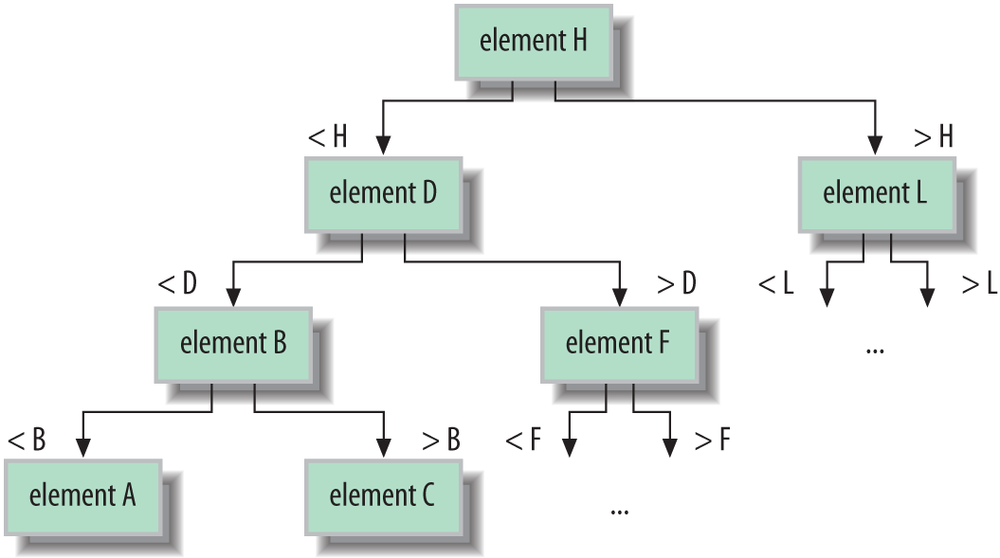
A tree is like a linked list in that it holds its elements in nodes that point to their neighbors. However, a tree, as its name suggests, does not have a linear structure, but instead arranges its elements in a cascade of branches like a family tree. The power of the tree structure is in sorting and searching elements that have a specified order. A binary search tree, as shown in Figure 11-4, arranges its elements such that the children divide up a range of values. One child holds values greater than the node and one child holds values lower. By applying this knowledge recursively on a properly “balanced” tree, we can rapidly find any value. The effort to search the tree is described as log(n) time, which means that it grows only with the logarithm of the number of elements, which is much better than the linear time it would take to check all of the elements by brute force.
Trees are useful for maintaining and searching large collections
of sorted elements. A similar concept that can be used for data that
rarely requires updates is to use a plain sorted array with a binary
search algorithm. In a binary search, you make (exponentially)
decreasing size jumps into the sorted array to approximate locations
for the element and then choose your next jump based on whether you
have overshot or undershot the target. The Java Arrays class has several binarySearch() methods that operate on
different types of arrays.
Hash maps are strange and magical beasts. A hash map (or
hash table, as it is also called) uses a mathematical hash algorithm
applied to its key value to distribute its element values into a
series of “buckets.” The algorithm relies on the hash algorithm to
distribute the elements as uniformly (randomly) as possible. To
retrieve an element by its key simply involves searching the correct
bucket. Because the hash calculation is fast and can have a large
number of buckets, there are few elements to search and retrieval is
very fast. As we described in Chapter 7, all
Java Objects have a hash value as
determined by the hashCode()
method. We’ll say more about hash codes and key values for maps later
in this chapter.
Hash map performance is governed by many factors, including the
sophistication of the hash algorithm implemented by its elements (see
Figure 11-5). In general, with a good
hash function implementation, the Java HashMap operates in constant time for
putting and retrieving elements. Hash maps are fast at mapping
unsorted collections.
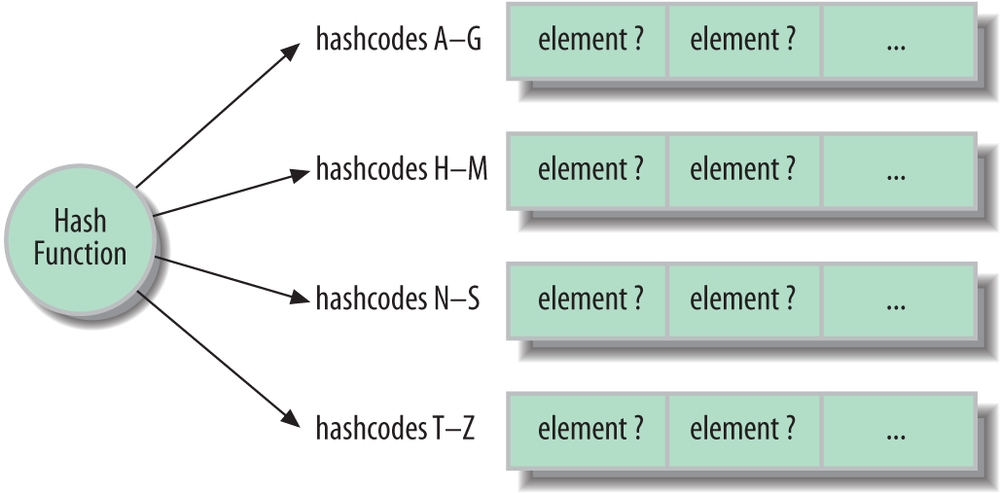
Table 11-7 lists the implementations of the Java Collections Framework by interface type.
Table 11-7. Collections Framework implementation classes
ArrayList and
LinkedList provide the array and
linked list implementations of the List interface that was described earlier.
ArrayList is satisfactory for most
purposes, but you should use LinkedList when you plan to do a lot of
insertions or deletions at various points in the list.
HashSet and
HashMap provide a
good hash map implementation of the Set and Map interfaces. The LinkedHashSet and
LinkedHashMap implementations
combine the hash algorithm with a linked list that maintains the
insertion order of the elements. Note that these
linked collections are ordered, but not sorted
collections.
TreeSet and TreeMap maintain sorted collections using a
tree data structure. In the case of TreeMap, it is the key
values that are sorted. The sorting is accomplished by a comparator
object. We’ll discuss sorting later in this chapter.
Queue is implemented both by
LinkedList (which implements
List, Queue, and—as of Java 7, Deque) and PriorityQueue. A PriorityQueue’s prioritization comes from a
sorting order determined by a comparator supplied with its
constructor. Elements that sort “least” or “lowest” have the highest
priority. The various implementations of BlockingQueue mirror these for
concurrency-aware queues.
Finally, IdentityHashMap is an
alternate type of HashMap that uses
object identity instead of object
equality to determine which keys match which
objects. Normally, any two objects that test equal with equals() operate as the same key in a
Map. With IdentityHashMap, only the original object
instance retrieves the element. We’ll talk about hash codes and keys
more in the next section.
We should also mention three specialized collections that we’ll
talk about later: EnumSet and
EnumMap are specifically designed
to work with Java enumerations. WeakHashMap uses weak references to
cooperate with Java garbage collection.
The term hash in Hashtable and
HashMap refers to the
key hash value that these collections use to make their associations.
Specifically, an element in a Hashtable or HashMap is not associated with a key strictly
by the key object’s identity but rather by a function of the key’s
contents. This allows keys that are equivalent to access the same
object. By “equivalent,” we mean those objects that compare true with equals(). If you store an object in a Hashtable using one object as a key, you can
use any other object that equals()
tells you is equivalent to retrieve the stored object.
It’s easy to see why equivalence is important if you remember our
discussion of strings. You may create two String objects that have the same characters
in them but that are different objects in Java. In this case, the
== operator tells you that the
String objects are different, but the
equals() method of the String class tells you that they are
equivalent. Because they are equivalent, if we store an object in a
HashMap using one of the String objects as a key, we can retrieve it
using the other.
The hash code of an object makes this association based on
content. As we mentioned in Chapter 7, the
hash code is like a fingerprint of the object’s data content. HashMap uses it to store the objects so that
they can be retrieved efficiently. The hash code is nothing more than a
number (an integer) that is a function of the data. The number is always
the same for identical data, but the hashing function is intentionally
designed to generate as different (random looking) a number as possible
for different combinations of data. In other words, a very small change
in the data should produce a big difference in the number. It should be
unlikely that two nonidentical datasets, even very similar ones, would
produce the same hash code.
As we described earlier, internally, HashMap really just keeps a number of lists of
objects, but it puts objects into the lists based on their hash code.
When it wants to find the object again, it can look at the hash code and
know immediately how to get to the appropriate list. The HashMap still might end up with a number of
objects to examine, but the list should be short. For each object in the
short list it finds, it does the following comparison to see if the key
matches:
if((keyHashcode==storedKeyHashcode)&&key.equals(storedKey))returnobject;
There is no prescribed way to generate hash codes. The only
requirement is that they be somewhat randomly distributed and
reproducible (based on the data). This means that two objects that are
not the same could end up with the same hash code by accident. This is
unlikely (there are 232 possible integer
values); moreover, it shouldn’t cause a problem because as you can see
in the preceding snippet, the HashMap
ultimately checks the actual keys using equals(), as well as the hash codes, to find
the match. Therefore, even if two key objects have the same hash code,
they can still coexist in the HashMap
as long as they don’t test equal to one another as well. (To put it
another way, if two keys’ hashcodes are the same and the equals method
says they are the same, then they will be considered the same key and
retrieve the same value object.)
Hash codes are computed by an object’s hashCode() method, which is inherited from the
Object class if it isn’t overridden.
The default hashCode() method simply
assigns each object instance a unique number to be used as a hash code.
If a class does not override this method, each instance of the class
will have a unique hash code. This goes along well with the default
implementation of equals() in
Object, which only compares objects
for identity using ==; the effect
being that these arbitrary objects serve as unique keys in maps.
You must override equals() in
any classes for which equivalence of different objects is meaningful.
Likewise, if you want equivalent objects to serve as equivalent keys,
you must override the hashCode()
method as well to return identical hash code values. To do this, you
need to create some suitably randomizing, arbitrary function of the
contents of your object. The only criterion for the function is that it
should be almost certain to return different values for objects with
different data, but the same value for objects with identical
data.
The java.util.Collections class
contains important static utility methods for working with Sets and Maps. All the methods in Collections operate on interfaces, so they
work regardless of the actual implementation classes you’re using. The
first methods we’ll look at involve creating synchronized versions of
our collections.
Most of the default collection implementations are not
synchronized; that is, they are not safe for concurrent access by
multiple threads. The reason for this is performance. In many
applications, there is no need for synchronization, so the Collections
API does not provide it by default. Instead, you can create a
synchronized version of any collection using the following methods of
the Collections class:
publicstaticCollectionsynchronizedCollection(Collectionc)publicstaticSetsynchronizedSet(Sets)publicstaticListsynchronizedList(Listlist)publicstaticMapsynchronizedMap(Mapm)publicstaticSortedSetsynchronizedSortedSet(SortedSets)publicstaticSortedMapsynchronizedSortedMap(SortedMapm)
These methods return synchronized, threadsafe versions of the
supplied collection, by wrapping them (in a new object that implements
the same interface and delegates the calls to the underlying
collection). For example, the following shows how to create a threadsafe
List:
Listlist=newArrayList();ListsyncList=Collections.synchronizedList(list);
Multiple threads can call methods on this list safely and they will block as necessary to wait for the other threads to complete.
In contrast to the norm, the older Hashtable and Vector collections are synchronized by default
(and, therefore, may be a bit slower when that’s not needed). The “copy
on write” collection implementations that we’ll talk about later also do
not require synchronization for their special applications. Finally, the
ConcurrentHashMap and ConcurrentLinkedQueue implementations that
we’ll cover later are threadsafe and designed specifically to support a
high degree of concurrent access without incurring
a significant penalty for their internal synchronization.
This is important, so remember this! Although
synchronized collections are threadsafe, the Iterators returned
from them are not. If you obtain an Iterator from a collection, you should do
your own synchronization to ensure that the collection does not change
as you’re iterating through its elements. A convention does this by
synchronizing on the collection itself with a synchronized block:
synchronized(syncList){Iteratoriterator=syncList.iterator();// do stuff with the iterator here}
If you do not synchronize on the collection while iterating and
the collection changes, Java attempts to throw a ConcurrentModificationException. However,
this is not guaranteed.
The java.util.concurrent.ConcurrentHashMap class
is part of the concurrency utilities package and provides a Map that performs well under multithreaded
access. A ConcurrentHashMap is safe
for access from multiple threads, but it does not necessarily block
threads during operations. Instead, some degree of overlapping
operations, such as concurrent reads, are permitted safely. The
ConcurrentHashMap can even allow a
limited number of concurrent writes to happen while reads are being
performed. These operations and iterators over the map do not throw a
ConcurrentModificationException,
but no guarantees are made as to exactly when one thread will see
another thread’s work. All views of the map are based upon the most
recently committed writes.
Similarly, the ConcurrentLinkedQueue implementation
provides the same sort of benefits for a linked queue, allowing some
degree of overlapping writes and reads by concurrent users.
You can use the Collections class to create read-only versions
of any collection:
publicstaticCollectionunmodifiableCollection(Collectionc)publicstaticSetunmodifiableSet(Sets)publicstaticListunmodifiableList(Listlist)publicstaticMapunmodifiableMap(Mapm)publicstaticSortedSetunmodifiableSortedSet(SortedSets)publicstaticSortedMapunmodifiableSortedMap(SortedMapm)
Making unmodifiable versions of collections is a useful way to
ensure that a collection handed off to another part of your code is not
modified intentionally or inadvertently. Attempting to modify a
read-only collection results in an UnsupportedOperationException.
The java.util.concurrent package contains the
CopyOnWriteArrayList
and CopyOnWriteArraySet List and
Set implementations. These classes
are threadsafe and do not require explicit synchronization, but are
heavily optimized for read operations. Any write operation causes the
entire data structure to be copied internally in a blocking operation.
The advantage is that if you are almost always reading, these
implementations are extremely fast and no synchronization is
required.
In Chapter 5, we introduced the
idea of weak references—object references that don’t prevent their
objects from being removed by the garbage collector. WeakHashMap is an implementation of Map that makes use of weak references in its
keys and values. This means that you don’t have to remove key/value
pairs from a Map when you’re finished
with them. Normally, if you removed all references to a key object from
the rest of your application, the Map
would still contain a reference and keep the object “alive,” preventing
garbage collection. WeakHashMap
changes this; once you remove all references to a key object from the
rest of the application, the WeakHashMap lets go of it, too and both the
key and its corresponding value (if it is similarly unreferenced) are
eligible for garbage collection.
EnumSet and EnumMap are collections designed to work
specifically with the limited domain of objects defined by a Java
enumerated type. (Enums are discussed in Chapter 5.) Java
enums are Java objects and there is no reason you can’t use them as keys
or values in collections otherwise. However, the EnumSet and EnumMap classes are highly optimized, taking
advantage of the knowledge that the set or keys in the map,
respectively, may be one of only a few individual objects. With this
knowledge, storage can be compact and fast using bit fields internally.
The idea is to make using collection operations on enumerations
efficient enough to replace the general usage pattern of bit-flags and
make binary logic operations unnecessary. Instead of using:
intflags=getFlags();if(flags&(Constants.ERROR|Constants.WARNING)!=0)
we could use set operations:
EnumSetflags=getFlags();if(flags.contains(Constants.Error)||flags.contains(Constants.Warning))
This code may not be as terse, but it is easier to understand and should be just as fast.
The Collections utilities include methods for performing common operations like sorting. Sorting comes in two varieties:
public static void sort(Listlist)This method sorts the given list. You can use this method only on lists whose elements implement the
java.lang.Comparableinterface. Luckily, many classes already implement this interface, includingString,Date,BigInteger, and the wrapper classes for the primitive types (Integer,Double, etc.).public static void sort(Listlist,Comparatorc)Use this method to sort a list whose elements don’t implement the
Comparableinterface. The suppliedjava.util.Comparatordoes the work of comparing elements. You might, for example, write anImaginaryNumberclass and want to sort a list of them. You would then create aComparatorimplementation that knew how to compare two imaginary numbers.
The sorted collections we discussed earlier, SortedSet and SortedMap, maintain their collections in a
specified order using the Comparable
interface of their elements. If the elements do not implement Comparable, you must supply a Comparator object yourself in the constructor
of the implementation. For example:
ComparatormyComparator=...SortedSetmySet=newTreeSet(myComparator);
Collections give you some other interesting capabilities, too. If
you’re interested in learning more, check out the min(), max(), binarySearch(), and reverse() methods.
Collections is a bread-and-butter topic, which means it’s
hard to create exciting examples. The example in this section reads a
text file, parses all its words, counts the number of occurrences, sorts
them, and writes the results to another file. It gives you a good feel
for how to use collections in your own programs. This example also shows
features including generics, autoboxing, and the Scanner API.
importjava.io.*;importjava.util.*;publicclassWordSort{publicstaticvoidmain(String[]args)throwsIOException{if(args.length<2){System.out.println("Usage: WordSort inputfile outputfile");return;}Stringinputfile=args[0];Stringoutputfile=args[1];/* Create the word map. Each key is a word and each value is anInteger that represents the number of times the word occursin the input file.*/Map<String,Integer>map=newTreeMap<>();Scannerscanner=newScanner(newFile(inputfile));while(scanner.hasNext()){Stringword=scanner.next();Integercount=map.get(word);count=(count==null?1:count+1);map.put(word,count);}scanner.close();// get the map's keysList<String>keys=newArrayList<>(map.keySet());// write the results to the output filePrintWriterout=newPrintWriter(newFileWriter(outputfile));for(Stringkey:keys)out.println(key+" : "+map.get(key));out.close();}}
Suppose, for example, that you have an input file named Ian Moore.txt:
WellitwasmylovethatkeptyougoingKeptyoustrongenoughtofallAnditwasmyheartyouwerebreakingWhenhehurtyourprideSohowdoesitfeelHowdoesitfeelHowdoesitfeelHowdoesitfeel
You could run the example on this file using the following command:
%javaWordSort"Ian Moore.txt"count.txt
The output file, count.txt, looks like this:
And:1How:3Kept:1So:1Well:1When:1breaking:1does:4enough:1...
The results are case-sensitive: “How” and “how” are recorded
separately. You could modify this behavior by converting words to all
lowercase after retrieving them from the Scanner.