Most fundamental I/O in Java is based on
streams. A stream represents a flow of data with (at
least conceptually) a writer at one end and a
reader at the other. When you are working with the
java.io package to perform terminal
input and output, reading or writing files, or communicating through
sockets in Java, you are using various types of streams. Later in this
chapter, we’ll look at the NIO package, which introduces a similar concept
called a channel. One difference betwen the two is
that streams are oriented around bytes or characters while channels are
oriented around “buffers” containing those data types—yet they perform
roughly the same job. Let’s start by summarizing the available types of
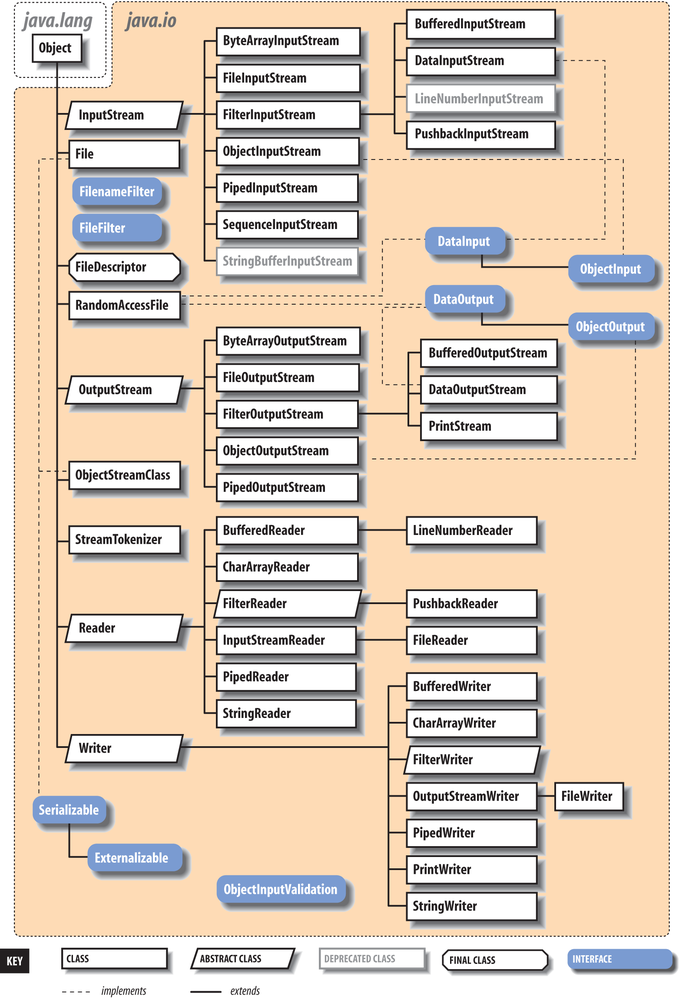
streams:
InputStream,OutputStreamAbstract classes that define the basic functionality for reading or writing an unstructured sequence of bytes. All other byte streams in Java are built on top of the basic
InputStreamandOutputStream.Reader,WriterAbstract classes that define the basic functionality for reading or writing a sequence of character data, with support for Unicode. All other character streams in Java are built on top of
ReaderandWriter.InputStreamReader,OutputStreamWriterClasses that bridge byte and character streams by converting according to a specific character encoding scheme. (Remember: in Unicode, a character is not a byte!)
DataInputStream,DataOutputStreamSpecialized stream filters that add the ability to read and write multibyte data types, such as numeric primitives and
Stringobjects in a universal format.ObjectInputStream,ObjectOutputStreamSpecialized stream filters that are capable of writing whole groups of serialized Java objects and reconstructing them.
BufferedInputStream,BufferedOutputStream,BufferedReader,BufferedWriterSpecialized stream filters that add buffering for additional efficiency. For real-world I/O, a buffer is almost always used.
PrintStream,PrintWriterSpecialized streams that simplify printing text.
PipedInputStream,PipedOutputStream,PipedReader,PipedWriter“Loopback” streams that can be used in pairs to move data within an application. Data written into a
PipedOutputStreamorPipedWriteris read from its correspondingPipedInputStreamorPipedReader.FileInputStream,FileOutputStream,FileReader,FileWriterImplementations of
InputStream,OutputStream,Reader, andWriterthat read from and write to files on the local filesystem.
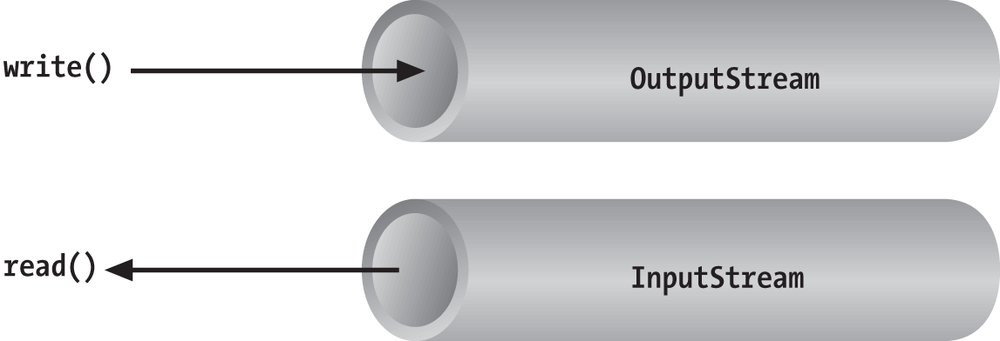
Streams in Java are one-way streets. The java.io input and output classes represent the
ends of a simple stream, as shown in Figure 12-2. For bidirectional conversations,
you’ll use one of each type of stream.
InputStream and
OutputStream are
abstract classes that define the lowest-level
interface for all byte streams. They contain methods for reading or
writing an unstructured flow of byte-level data. Because these classes are
abstract, you can’t create a generic input or output stream. Java
implements subclasses of these for activities such as reading from and
writing to files and communicating with sockets. Because all byte streams
inherit the structure of InputStream or
OutputStream, the various kinds of byte
streams can be used interchangeably. A method specifying an InputStream as an argument can accept any
subclass of InputStream. Specialized
types of streams can also be layered or wrapped around basic streams to
add features such as buffering, filtering, or handling higher-level data
types.
Reader and Writer are very much like
InputStream and OutputStream, except that they deal with
characters instead of bytes. As true character streams, these classes
correctly handle Unicode characters, which is not always the case with
byte streams. Often, a bridge is needed between these character streams
and the byte streams of physical devices, such as disks and networks.
InputStreamReader and OutputStreamWriter are special classes that use
a character-encoding scheme to translate between
character and byte streams.
This section describes all the interesting stream types with the
exception of FileInputStream, FileOutputStream, FileReader, and FileWriter. We postpone the discussion of file
streams until the next section, where we cover issues involved with
accessing the filesystem in Java.
The prototypical example of an InputStream object is
the standard input of a Java application. Like
stdin in C or cin in C++, this is the source of input to a
command-line (non-GUI) program. It is an input stream from the
environment—usually a terminal window or possibly the output of another
command. The java.lang.System class,
a general repository for system-related resources, provides a reference
to the standard input stream in the static variable System.in. It also
provides a standard output stream and a
standard error stream in the out and err variables,
respectively.[34] The following example shows the correspondence:
InputStreamstdin=System.in;OutputStreamstdout=System.out;OutputStreamstderr=System.err;
This snippet hides the fact that System.out and System.err aren’t just OutputStream objects, but more specialized and
useful PrintStream objects. We’ll
explain these later, but for now we can reference out and err
as OutputStream objects because they
are derived from OutputStream.
We can read a single byte at a time from standard input with the
InputStream’s read() method. If you
look closely at the API, you’ll see that the read() method of the base InputStream class is an abstract method. What lies behind System.in is a particular implementation of
InputStream that provides the real
implementation of the read()
method:
try{intval=System.in.read();}catch(IOExceptione){...}
Although we said that the read() method reads a byte value, the return
type in the example is int, not
byte. That’s because the read() method of basic input streams in Java
uses a convention carried over from the C language to indicate the end
of a stream with a special value. Data byte values are returned as
unsigned integers in the range 0 to 255 and the special value of
-1 is used to indicate that end of
stream has been reached. You’ll need to test for this condition when
using the simple read() method. You
can then cast the value to a byte if needed. The following example reads
each byte from an input stream and prints its value:
try{intval;while((val=System.in.read())!=-1)System.out.println((byte)val);}catch(IOExceptione){...}
As we’ve shown in the examples, the read() method can also throw an IOException if there is
an error reading from the underlying stream source. Various subclasses
of IOException may indicate that a
source such as a file or network connection has had an error.
Additionally, higher-level streams that read data types more complex
than a single byte may throw EOFException (“end of file”), which indicates
an unexpected or premature end of stream.
An overloaded form of read()
fills a byte array with as much data as possible up to the capacity of
the array and returns the number of bytes read:
byte[]buff=newbyte[1024];intgot=System.in.read(buff);
In theory, we can also check the number of bytes available for
reading at a given time on an InputStream using the available() method. With that information, we
could create an array of exactly the right size:
intwaiting=System.in.available();if(waiting>0){byte[]data=newbyte[waiting];System.in.read(data);...}
However, the reliability of this technique depends on the ability of the underlying stream implementation to detect how much data can be retrieved. It generally works for files but should not be relied upon for all types of streams.
These read() methods block
until at least some data is read (at least one byte). You must, in
general, check the returned value to determine how much data you got and
if you need to read more. (We look at nonblocking I/O later in this
chapter.) The skip() method of
InputStream provides a way of jumping
over a number of bytes. Depending on the implementation of the stream,
skipping bytes may be more efficient than reading them.
The close() method shuts
down the stream and frees up any associated system resources. It’s
important for performance to remember to close most types of streams
when you are finished using them. In some cases, streams may be closed
automatically when objects are garbage-collected, but it is not a good
idea to rely on this behavior. In Java 7, the try-with-resources language feature
was added to make automatically closing streams and other closeable
entities easier. We’ll see some examples of that later in this chapter.
The flag interface java.io.Closeable
identifies all types of stream, channel, and related utility classes
that can be closed.
Finally, we should mention that in addition to the System.in and System.out standard streams, Java provides the
java.io.Console API through System.console(). You can use the Console to read passwords without echoing them
to the screen.
In early versions of Java, some InputStream and OutputStream types included methods for
reading and writing strings, but most of them operated by naively
assuming that a 16-bit Unicode character was equivalent to an 8-bit byte
in the stream. This works only for Latin-1 (ISO 8859-1) characters and
not for the world of other encodings that are used with different
languages. In Chapter 10, we saw that the
java.lang.String class has a byte
array constructor and a corresponding getBytes() method that each accept character
encoding as an argument. In theory, we could use these as tools to
transform arrays of bytes to and from Unicode characters so that we
could work with byte streams that represent character data in any
encoding format. Fortunately, however, we don’t have to rely on this
because Java has streams that handle this for us.
The java.io Reader and Writer character stream classes were
introduced as streams that handle character data only. When you use
these classes, you think only in terms of characters and string data and
allow the underlying implementation to handle the conversion of bytes to
a specific character encoding. As we’ll see, some direct implementations
of Reader and Writer exist, for
example, for reading and writing files. But more generally, two special
classes, InputStreamReader and
OutputStreamWriter,
bridge the gap between the world of character streams and the world of
byte streams. These are, respectively, a Reader and a Writer that can be wrapped around any
underlying byte stream to make it a character stream. An encoding scheme
is used to convert between possible multibyte encoded values and Java
Unicode characters. An encoding scheme can be specified by name in the
constructor of InputStreamReader or
OutputStreamWriter. For convenience,
the default constructor uses the system’s default encoding
scheme.
For example, let’s parse a human-readable string from the standard
input into an integer. We’ll assume that the bytes coming from
System.in use the
system’s default encoding scheme:
try{InputStreamin=System.in;InputStreamReadercharsIn=newInputStreamReader(in);BufferedReaderbufferedCharsIn=newBufferedReader(inReader);Stringline=bufferedCharsIn.readLine();inti=NumberFormat.getInstance().parse(line).intValue();}catch(IOExceptione){}catch(ParseExceptionpe){}
First, we wrap an InputStreamReader around System.in. This reader converts the incoming
bytes of System.in to characters
using the default encoding scheme. Then, we wrap a BufferedReader around
the InputStreamReader. BufferedReader adds the readLine() method,
which we can use to grab a full line of text (up to a platform-specific,
line-terminator character combination) into a String. The string is then parsed into an
integer using the techniques described in Chapter 10.
The important thing to note is that we have taken a byte-oriented
input stream, System.in, and safely
converted it to a Reader for reading
characters. If we wished to use an encoding other than the system
default, we could have specified it in the InputStreamReader’s constructor like
so:
InputStreamReaderreader=newInputStreamReader(System.in,"UTF-8");
For each character that is read from the reader, the InputStreamReader reads one or more bytes and
performs the necessary conversion to Unicode.
In Chapter 13, we use an InputStreamReader and a Writer in our simple web server example, where
we must use a character encoding specified by the HTTP protocol. We also
return to the topic of character encodings when we discuss the java.nio.charset API, which allows you to
query for and use encoders and decoders explicitly on buffers of
characters and bytes. Both InputStreamReader and OutputStreamWriter can accept a Charset codec object as well as a character
encoding name.
What if we want to do more than read and write a sequence
of bytes or characters? We can use a “filter” stream, which is a type of
InputStream, OutputStream, Reader, or Writer that wraps another stream and adds new
features. A filter stream takes the target stream as an argument in its
constructor and delegates calls to it after doing some additional
processing of its own. For example, we can construct a BufferedInputStream to
wrap the system standard input:
InputStreambufferedIn=newBufferedInputStream(System.in);
The BufferedInputStream is a
type of filter stream that reads ahead and buffers a certain amount of
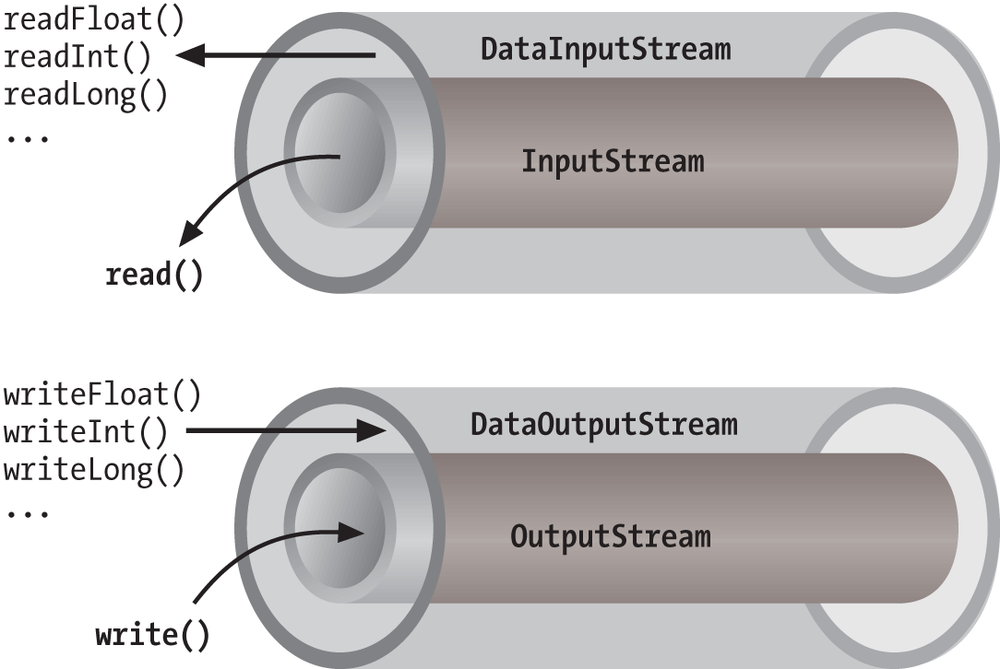
data. (We’ll talk more about it later in this chapter.) The BufferedInputStream wraps an additional layer
of functionality around the underlying stream. Figure 12-3 shows this arrangement for a
DataInputStream, which
is a type of stream that can read higher-level data types, such as Java
primitives and strings.
As you can see from the previous code snippet, the BufferedInputStream filter is a type of
InputStream. Because filter streams
are themselves subclasses of the basic stream types, they can be used as
arguments to the construction of other filter streams. This allows
filter streams to be layered on top of one another to provide different
combinations of features. For example, we could first wrap our System.in with a BufferedInputStream and then wrap the BufferedInputStream with a DataInputStream for reading special data types
with buffering.
Java provides base classes for creating new types of filter
streams: FilterInputStream,
FilterOutputStream,
FilterReader, and
FilterWriter. These
superclasses provide the basic machinery for a “no op” filter (a filter
that doesn’t do anything) by delegating all their method calls to their
underlying stream. Real filter streams subclass these and override
various methods to add their additional processing. We’ll make an
example filter stream later in this chapter.
DataInputStream and
DataOutputStream are
filter streams that let you read or write strings and primitive data
types composed of more than a single byte. DataInputStream and DataOutputStream implement the DataInput and
DataOutput
interfaces, respectively. These interfaces define methods for reading
or writing strings and all of the Java primitive types, including
numbers and Boolean values. DataOutputStream encodes these values in a
machine-independent manner and then writes them to its underlying byte
stream. DataInputStream does the
converse.
You can construct a DataInputStream from an InputStream and then use a method such as
readDouble() to read
a primitive data type:
DataInputStreamdis=newDataInputStream(System.in);doubled=dis.readDouble();
This example wraps the standard input stream in a DataInputStream and uses it to read a
double value. The readDouble() method reads bytes from the
stream and constructs a double from
them. The DataInputStream methods
expect the bytes of numeric data types to be in network byte
order, a standard that specifies that the high-order bytes
are sent first (also known as “big endian,” as we discuss
later).
The DataOutputStream class
provides write methods that correspond to the read methods in DataInputStream. For example, writeInt() writes an
integer in binary format to the underlying output stream.
The readUTF() and
writeUTF() methods of
DataInputStream and DataOutputStream read and write a Java
String of Unicode characters using
the UTF-8 “transformation format” character encoding. UTF-8 is an
ASCII-compatible encoding of Unicode characters that is very widely
used. Not all encodings are guaranteed to preserve all Unicode
characters, but UTF-8 does. You can also use UTF-8 with Reader and Writer streams by specifying it as the
encoding name.
The BufferedInputStream,
BufferedOutputStream,
BufferedReader, and
BufferedWriter
classes add a data buffer of a specified size to the stream path. A
buffer can increase efficiency by reducing the number of physical read
or write operations that correspond to read() or write() method calls.
You create a buffered stream with an appropriate input or output
stream and a buffer size. (You can also wrap another stream around a
buffered stream so that it benefits from the buffering.) Here’s a
simple buffered input stream called bis:
BufferedInputStreambis=newBufferedInputStream(myInputStream,32768);...bis.read();
In this example, we specify a buffer size of 32 KB. If we leave
off the size of the buffer in the constructor, a reasonably sized one
is chosen for us. (Currently the default is 8 KB.) On our first call
to read(), bis tries to fill our entire 32 KB buffer
with data, if it’s available. Thereafter, calls to read() retrieve data from the buffer, which
is refilled as necessary.
A BufferedOutputStream works
in a similar way. Calls to write()
store the data in a buffer; data is actually written only when the
buffer fills up. You can also use the flush() method to
wring out the contents of a BufferedOutputStream at any time. The
flush() method is actually a method
of the OutputStream class itself.
It’s important because it allows you to be sure that all data in any
underlying streams and filter streams has been sent (before, for
example, you wait for a response).
Some input streams such as BufferedInputStream support the ability to
mark a location in the data and later reset the stream to that
position. The mark() method sets
the return point in the stream. It takes an integer value that
specifies the number of bytes that can be read before the stream gives
up and forgets about the mark. The reset() method
returns the stream to the marked point; any data read after the call
to mark() is read again.
This functionality could be useful when you are reading the stream in a parser. You may occasionally fail to parse a structure and so must try something else. In this situation, you can have your parser generate an error and then reset the stream to the point before it began parsing the structure:
BufferedInputStreaminput;...try{input.mark(MAX_DATA_STRUCTURE_SIZE);return(parseDataStructure(input));}catch(ParseExceptione){input.reset();...}
The BufferedReader and
BufferedWriter classes work just
like their byte-based counterparts, except that they operate on
characters instead of bytes.
Another useful wrapper stream is java.io.PrintWriter. This class provides a
suite of overloaded print() methods
that turn their arguments into strings and push them out the stream. A
complementary set of println()
convenience methods appends a new line to the end of the strings. For
formatted text output, printf() and the
identical format() methods allow
you to write printf-style formatted
text to the stream.
PrintWriter is an unusual
character stream because it can wrap either an OutputStream or another Writer. PrintWriter is the more capable big brother
of the legacy PrintStream byte
stream. The System.out and System.err streams are PrintStream objects; you have already seen
such streams strewn throughout this book:
System.out.("Hello, world...\n");System.out.println("Hello, world...");System.out.printf("The answer is %d",17);System.out.println(3.14);
Early versions of Java did not have the Reader and Writer classes and used PrintStream, which convert bytes to
characters by simply made assumptions about the character encoding.
You should use a PrintWriter for
all new development.
When you create a PrintWriter
object, you can pass an additional Boolean value to the constructor,
specifying whether it should “auto-flush.” If this value is true, the PrintWriter automatically performs a
flush() on the underlying OutputStream or Writer each time it sends a newline:
PrintWriterpw=newPrintWriter(myOutputStream,true/*autoFlush*/);pw.println("Hello!");// Stream is automatically flushed by the newline.
When this technique is used with a buffered output stream, it corresponds to the behavior of terminals that send data line by line.
The other big advantage that print streams have over regular
character streams is that they shield you from exceptions thrown by
the underlying streams. Unlike methods in other stream classes, the
methods of PrintWriter and PrintStream do not throw IOExceptions. Instead, they provide a method
to explicitly check for errors if required. This makes life a lot
easier for printing text, which is a very common operation. You can
check for errors with the checkError()
method:
System.out.println(reallyLongString);if(System.out.checkError()){...// uh oh
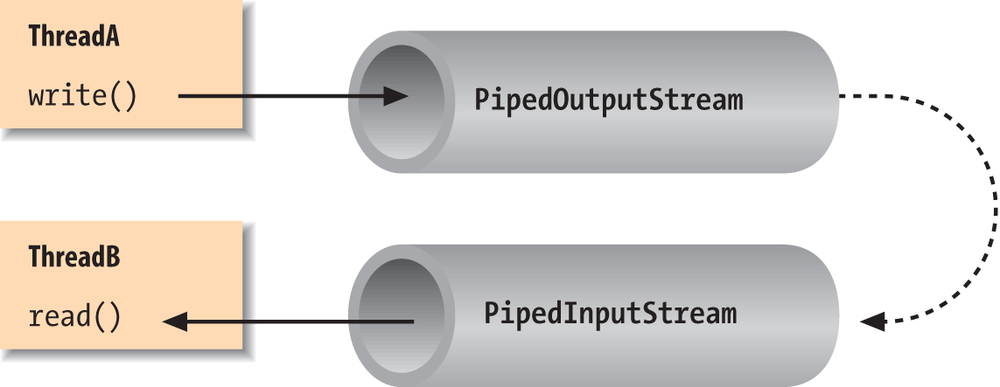
Normally, our applications are directly involved with one
side of a given stream at a time. PipedInputStream and
PipedOutputStream (or
PipedReader and PipedWriter), however, let us create two sides
of a stream and connect them, as shown in Figure 12-4. This can be used to provide a
stream of communication between threads, for example, or as a “loopback”
for testing. Often it’s used as a crutch to interface a stream-oriented
API to a non-stream-oriented API.
To create a bytestream pipe, we use both a PipedInputStream and a PipedOutputStream. We can simply choose a side
and then construct the other side using the first as an argument:
PipedInputStreampin=newPipedInputStream();PipedOutputStreampout=newPipedOutputStream(pin);
Alternatively:
PipedOutputStreampout=newPipedOutputStream();PipedInputStreampin=newPipedInputStream(pout);
In each of these examples, the effect is to produce an input
stream, pin, and an output stream,
pout, that are connected. Data
written to pout can then be read by
pin. It is also possible to create
the PipedInputStream and the PipedOutputStream separately and then connect
them with the connect()
method.
We can do exactly the same thing in the character-based world,
using PipedReader and
PipedWriter in place of
PipedInputStream and PipedOutputStream.
After the two ends of the pipe are connected, use the two streams
as you would other input and output streams. You can use read() to read data from the PipedInputStream (or PipedReader) and write() to write data to the PipedOutputStream (or PipedWriter). If the internal buffer of the
pipe fills up, the writer blocks and waits until space is available.
Conversely, if the pipe is empty, the reader blocks and waits until some
data is available.
One advantage to using piped streams is that they provide stream
functionality in our code without compelling us to build new,
specialized streams. For example, we can use pipes to create a simple
logging or “console” facility for our application. We can send messages
to the logging facility through an ordinary PrintWriter, and then it can do whatever
processing or buffering is required before sending the messages off to
their ultimate destination. Because we are dealing with string messages,
we use the character-based PipedReader and PipedWriter classes. The following example
shows the skeleton of our logging facility:
classLoggerDaemonextendsThread{PipedReaderin=newPipedReader();LoggerDaemon(){start();}publicvoidrun(){BufferedReaderbin=newBufferedReader(in);Strings;try{while((s=bin.readLine())!=null){// process line of data}}catch(IOExceptione){}}PrintWritergetWriter()throwsIOException{returnnewPrintWriter(newPipedWriter(in));}}classmyApplication{publicstaticvoidmain(String[]args)throwsIOException{PrintWriterout=newLoggerDaemon().getWriter();out.println("Application starting...");// ...out.println("Warning: does not compute!");// ...}}
LoggerDaemon reads
strings from its end of the pipe, the PipedReader named in. LoggerDaemon also provides a method,
getWriter(), which
returns a PipedWriter that is
connected to its input stream. To begin sending messages, we create a
new LoggerDaemon and fetch the output
stream. In order to read strings with the readLine() method,
LoggerDaemon wraps a BufferedReader around its PipedReader. For convenience, it also presents
its output pipe as a PrintWriter
rather than a simple Writer.
One advantage of implementing LoggerDaemon with pipes is that we can log
messages as easily as we write text to a terminal or any other stream.
In other words, we can use all our normal tools and techniques,
including printf(). Another advantage
is that the processing happens in another thread, so we can go about our
business while any processing takes place.
StringReader is
another useful stream class; it essentially wraps stream functionality
around a String. Here’s how to use a
StringReader:
Stringdata="There once was a man from Nantucket...";StringReadersr=newStringReader(data);charT=(char)sr.read();charh=(char)sr.read();chare=(char)sr.read();
Note that you will still have to catch IOExceptions that are
thrown by some of the StringReader’s
methods.
The StringReader class is
useful when you want to read data from a String as if it were coming from a stream,
such as a file, pipe, or socket. Suppose you create a parser that
expects to read from a stream, but you want to provide an alternative
method that also parses a big string. You can easily add one using
StringReader.
Turning things around, the StringWriter class lets
us write to a character buffer via an output stream. The internal buffer
grows as necessary to accommodate the data. When we are done, we can
fetch the contents of the buffer as a String. In the following example, we create a
StringWriter and wrap it in a
PrintWriter for
convenience:
StringWriterbuffer=newStringWriter();PrintWriterout=newPrintWriter(buffer);out.println("A moose once bit my sister.");out.println("No, really!");Stringresults=buffer.toString();
First, we print a few lines to the output stream to give it some
data and then retrieve the results as a string with the toString() method. Alternately, we could get
the results as a StringBuffer object
using the getBuffer()
method.
The StringWriter class is
useful if you want to capture the output of something that normally
sends output to a stream, such as a file or the console. A PrintWriter wrapped around a StringWriter is a viable alternative to using
a StringBuffer to construct large
strings piece by piece.
The ByteArrayInputStream
and ByteArrayOutputStream
work with bytes in the same way the previous examples worked with
characters. You can write byte data to a ByteArrayOutputStream and retrieve it later
with the toByteArray() method.
Conversely, you can construct a ByteArrayInputStream from a byte array as
StringReader does with a String. For example, if we want to see exactly
what our DataOutputStream is writing
when we tell it to encode a particular value, we could capture it with a
byte array output stream:
ByteArrayOutputStreambao=newByteArrayOutputStream();DataOutputStreamdao=newDataOutputStream(bao);dao.writeInt(16777216);dao.flush();byte[]bytes=bao.toByteArray();for(byteb:bytes)System.out.println(b);// 1, 0, 0, 0
Before we leave streams, let’s try making one of our own.
We mentioned earlier that specialized stream wrappers are built on top
of the FilterInputStream and
FilterOutputStream
classes. It’s quite easy to create our own subclass of FilterInputStream that can be wrapped around
other streams to add new functionality.
The following example, rot13InputStream, performs a
rot13 (rotate by 13 letters) operation on the bytes
that it reads. rot13 is a trivial obfuscation
algorithm that shifts alphabetic characters to make them not quite
human-readable (it simply passes over nonalphabetic characters without
modifying them). rot13 is cute because it’s
symmetric: to “un-rot13” some text, you simply rot13 it again. Here’s
our rot13InputStream class:
publicclassrot13InputStreamextendsFilterInputStream{publicrot13InputStream(InputStreami){super(i);}publicintread()throwsIOException{returnrot13(in.read());}// should override additional read() methodsprivateintrot13(intc){if((c>='A')&&(c<='Z'))c=(((c-'A')+13)%26)+'A';if((c>='a')&&(c<='z'))c=(((c-'a')+13)%26)+'a';returnc;}}
The FilterInputStream needs to
be initialized with an InputStream;
this is the stream to be filtered. We provide an appropriate constructor
for the rot13InputStream class and
invoke the parent constructor with a call to super(). FilterInputStream contains a protected
instance variable, in, in which it
stores a reference to the specified InputStream, making it available to the rest
of our class.
The primary feature of a FilterInputStream is that it delegates its
input tasks to the underlying InputStream. For instance, a call to FilterInputStream’s read() method simply turns around and calls
the read() method of the underlying
InputStream to fetch a byte. The
filtering happens when we do our extra work on the data as it passes
through. In our example, the read()
method fetches a byte from the underlying InputStream, in, and then performs the rot13 shift on the
byte before returning it. The rot13()
method shifts alphabetic characters while simply passing over all other
values, including the end-of-stream value (-1). Our subclass is now a rot13
filter.
read() is the only InputStream method that FilterInputStream overrides. All other normal
functionality of an InputStream, such
as skip() and available(), is
unmodified, so calls to these methods are answered by the underlying
InputStream.
Strictly speaking, rot13InputStream works only on an ASCII byte
stream because the underlying algorithm is based on the Roman alphabet.
A more generalized character-scrambling algorithm would have to be based
on FilterReader to handle 16-bit
Unicode classes correctly. (Anyone want to try rot32768?) We should also
note that we have not fully implemented our filter: we should also
override the version of read() that
takes a byte array and range specifiers, perhaps delegating it to our
own read. Unless we do so, a reader
using that method would get the raw stream.
[34] Standard error is a stream that is usually reserved for error-related text messages that should be shown to the user of a command-line application. It is differentiated from the standard output, which often might be redirected to a file or another application and not seen by the user.