Sockets are a low-level programming interface for networked communications. They send streams of data between applications that may or may not be on the same host. Sockets originated in BSD Unix and are, in some programming languages, hairy, complicated things with lots of small parts that can break off and endanger little children. The reason for this is that most socket APIs can be used with almost any kind of underlying network protocol. Since the protocols that transport data across the network can have radically different features, the socket interface can be quite complex.[37]
The java.net package supports
a simplified, object-oriented socket interface that makes network
communications considerably easier. If you’ve done network programming
using sockets in other languages, you should be pleasantly surprised at
how simple things can be when objects encapsulate the gory details. If
this is the first time you’ve come across sockets, you’ll find that
talking to another application over the network can be as simple as
reading a file or getting user input. Most forms of I/O in Java, including
most network I/O, use the stream classes described in Chapter 12. Streams provide a unified I/O interface so
that reading or writing across the Internet is similar to reading or
writing on the local system. In addition to the stream-oriented
interfaces, the Java networking APIs can work with the Java NIO
buffer-oriented API for highly scalable applications. We’ll see both in
this chapter.
Java provides sockets to support three distinct classes of
underlying protocols: Sockets,
DatagramSockets, and
MulticastSockets. In this
first section, we look at Java’s basic Socket class, which uses a connection-oriented and
reliable protocol. A connection-oriented protocol
provides the equivalent of a telephone conversation. After establishing a
connection, two applications can send streams of data back and forth and
the connection stays in place even when no one is talking. Because the
protocol is reliable, it also ensures that no data is lost (resending data
as necessary) and that whatever you send always arrives in the order in
which you sent it.
In the next section, we look at the DatagramSocket class, which uses a connectionless,
unreliable protocol. A connectionless protocol is
like the postal service. Applications can send short messages to each
other, but no end-to-end connection is set up in advance and no attempt is
made to keep the messages in order. It’s not even guaranteed that the
messages will arrive at all. A MulticastSocket is a
variation of a DatagramSocket that
performs multicasting—simultaneously sending data to multiple recipients.
Working with multicast sockets is very much like working with datagram
sockets. However, because multicasting is currently not widely supported
across the Internet, we do not cover it here.
In theory, just about any protocol can be used underneath the socket
layer (old-schoolers will remember things like Novell’s IPX, Apple’s
AppleTalk, etc.). But in practice, there’s only one important protocol
family used on the Internet, and only one protocol family that Java
supports: the Internet Protocol (IP). The Socket class speaks TCP,
the connection-oriented flavor of IP, and the DatagramSocket class
speaks UDP, the connectionless kind.
When writing network applications, it’s common to talk about clients and servers. The distinction is increasingly vague, but the side that initiates the conversation is usually considered the client. The side that accepts the request is usually the server. In the case where two peer applications use sockets to talk, the distinction is less important, but for simplicity we’ll use this definition.
For our purposes, the most important difference between a client
and a server is that a client can create a socket to initiate a
conversation with a server application at any time, while a server must
be prepared in advance to listen for incoming conversations. The
java.net.Socket class represents one
side of an individual socket connection on both the client and server.
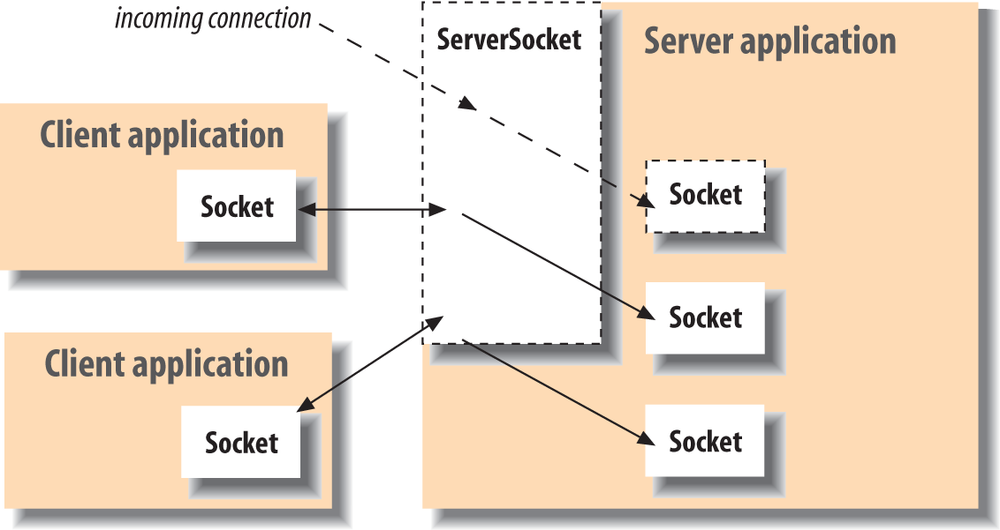
In addition, the server uses the java.net.ServerSocket
class to listen for new connections from clients. In most cases, an
application acting as a server creates a ServerSocket object and waits, blocked in a
call to its accept() method, until
a connection arrives. When it arrives, the accept() method creates a Socket object that the server uses to
communicate with the client. A server may carry on conversations with
multiple clients at once; in this case, there is still only a single
ServerSocket, but the server has
multiple Socket objects—one
associated with each client, as shown in Figure 13-2.
At the socket level, a client needs two pieces of information to locate and connect to a server on the Internet: a hostname (used to find the host computer’s network address) and a port number. The port number is an identifier that differentiates between multiple clients or servers on the same host. A server application listens on a prearranged port while waiting for connections. Clients use the port number assigned to the service they want to access. If you think of the host computers as hotels and the applications as guests, the ports are like the guests’ room numbers. For one person to call another, he or she must know the other party’s hotel name and room number.
A client application opens a connection to a server by
constructing a Socket that specifies
the hostname and port number of the desired server:
try{Socketsock=newSocket("wupost.wustl.edu",25);}catch(UnknownHostExceptione){System.out.println("Can't find host.");}catch(IOExceptione){System.out.println("Error connecting to host.");}
This code fragment attempts to connect a Socket to port 25 (the SMTP mail service) of
the host wupost.wustl.edu. The client handles the
possibility that the hostname can’t be resolved (UnknownHostException) and that it might not
be able to connect to it (IOException). In the preceding case, Java
used DNS, the standard Domain Name Service, to resolve the hostname to
an IP address for us. The constructor can also accept a string
containing the host’s raw IP address:
Socketsock=newSocket("22.66.89.167",25);
After a connection is made, input and output streams can be
retrieved with the Socket
getInputStream() and getOutputStream()
methods. The following (rather arbitrary) code sends and receives some
data with the streams:
try{Socketserver=newSocket("foo.bar.com",1234);InputStreamin=server.getInputStream();OutputStreamout=server.getOutputStream();// write a byteout.write(42);// write a newline or carriage return delimited stringPrintWriterpout=newPrintWriter(out,true);pout.println("Hello!");// read a bytebyteback=(byte)in.read();// read a newline or carriage return delimited stringBufferedReaderbin=newBufferedReader(newInputStreamReader(in));Stringresponse=bin.readLine();// send a serialized Java objectObjectOutputStreamoout=newObjectOutputStream(out);oout.writeObject(newjava.util.Date());oout.flush();server.close();}catch(IOExceptione){...}
In this exchange, the client first creates a Socket for communicating with the server.
The Socket constructor specifies
the server’s hostname (foo.bar.com) and a
prearranged port number (1234). Once the connection is established,
the client writes a single byte to the server using the OutputStream’s write() method. To send a string of text
more easily, it then wraps a PrintWriter around the OutputStream. Next, it performs the
complementary operations: reading a byte back from the server using
InputStream’s read() method and then creating a BufferedReader from which to get a full
string of text. Finally, we do something really funky and send a
serialized Java object to the server, using an ObjectOutputStream. (We’ll talk in depth
about sending serialized objects later in this chapter.) The client
then terminates the connection with the close() method. All these operations have
the potential to generate IOExceptions; our
application will deal with these using the catch clause.
After a connection is established, a server application
uses the same kind of Socket object
for its side of the communications. However, to accept a connection
from a client, it must first create a ServerSocket, bound
to the correct port. Let’s recreate the previous conversation from the
server’s point of view:
// Meanwhile, on foo.bar.com...try{ServerSocketlistener=newServerSocket(1234);while(!finished){Socketclient=listener.accept();// wait for connectionInputStreamin=client.getInputStream();OutputStreamout=client.getOutputStream();// read a bytebytesomeByte=(byte)in.read();// read a newline or carriage-return-delimited stringBufferedReaderbin=newBufferedReader(newInputStreamReader(in));StringsomeString=bin.readLine();// write a byteout.write(43);// say goodbyePrintWriterpout=newPrintWriter(out,true);pout.println("Goodbye!");// read a serialized Java objectObjectInputStreamoin=newObjectInputStream(in);Datedate=(Date)oin.readObject();client.close();}listener.close();}catch(IOExceptione){...}catch(ClassNotFoundExceptione2){...}
First, our server creates a ServerSocket attached to port 1234. On some
systems, there are rules about which ports an application can use.
Port numbers below 1024 are usually reserved for system processes and
standard, well-known services, so we pick a port
number outside of this range. The ServerSocket is created only once;
thereafter, we can accept as many connections as arrive.
Next, we enter a loop, waiting for the accept() method of
the ServerSocket to return an
active Socket connection from a
client. When a connection has been established, we perform the server
side of our dialog, then close the connection and return to the top of
the loop to wait for another connection. Finally, when the server
application wants to stop listening for connections altogether, it
calls the close() method of the
ServerSocket.
This server is single-threaded; it handles one connection at a
time, not calling accept() to
listen for a new connection until it’s finished with the current
connection. A more realistic server would have a loop that accepts
connections concurrently and passes them off to their own threads for
processing. There is a lot to be said about implementing multithreaded
servers. Later in this chapter, we’ll create a tiny web server that
starts a new thread for each connection and also a slightly more
complex web server that uses the NIO package to handle many
connections with a small number of threads.
The previous examples presuppose that the client has permission to connect to the server and that the server is allowed to listen on the specified socket. If you’re writing a general, standalone application, this is normally the case (and you can probably skip this section). However, untrusted applications (such as Java applets in a web browser) run under the auspices of a security policy that can impose arbitrary restrictions on what hosts they may or may not talk to and whether or not they can listen for connections.
For example, the security policy imposed on applets by most browsers allow untrusted applets to open socket connections only to the host that served them—that is, they can talk back only to the server from which their class files were retrieved. Untrusted applets are generally not allowed to open server sockets for incoming connections themselves. This doesn’t mean that an untrusted applet can’t cooperate with its server to communicate with anyone, anywhere. The applet’s server could run a proxy that lets the applet communicate indirectly with anyone it likes. What this security policy prevents is malicious applets poking around inside corporate firewalls, making connections to trusted services. It places the burden of security on the originating server, not the client machine. Restricting access to the originating server limits the usefulness of Trojan applications that do annoying things from the client side. (You probably won’t let your proxy spam people, because you’ll be blamed.)
If you are going to run your own application under a security manager, you should be aware that the default security manager dissallows all network access. So in order to make network connections, you would have to modify your policy file to grant the appropriate permissions to your code (see Chapter 3 for details). The following policy file fragment sets the socket permissions to allow connections to or from any host on any nonprivileged port:
grant{permissionjava.net.SocketPermission"*:1024-","listen,accept,connect";};
When starting the Java interpreter, you can install the security manager and use this file (call it mysecurity.policy):
%java-Djava.security.manager\-Djava.security.policy=mysecurity.policyMyApplication
In the past, many networked computers ran a simple time
service that dispensed their clock’s local time on a well-known port.
This was a precursor of NTP, the more general Network Time Protocol. The
next example, DateAtHost, includes a
subclass of java.util.Date that
fetches the time from a remote host instead of initializing itself from
the local clock. (See Chapter 11 for a
complete discussion of the Date
class.)
DateAtHost connects to the time
service (port 37) and reads four bytes representing the time on the
remote host. These four bytes have a peculiar specification that we
decode to get the time. Here’s the code:
//file: DateAtHost.javaimportjava.net.Socket;importjava.io.*;publicclassDateAtHostextendsjava.util.Date{staticinttimePort=37;// seconds from start of 20th century to Jan 1, 1970 00:00 GMTstaticfinallongoffset=2208988800L;publicDateAtHost(Stringhost)throwsIOException{this(host,timePort);}publicDateAtHost(Stringhost,intport)throwsIOException{Socketserver=newSocket(host,port);DataInputStreamdin=newDataInputStream(server.getInputStream());inttime=din.readInt();server.close();setTime((((1L<<32)+time)-offset)*1000);}}
That’s all there is to it. It’s not very long, even with a few
frills. We have supplied two possible constructors for DateAtHost. Normally we’d expect to use the
first, which simply takes the name of the remote host as an argument.
The second constructor specifies the hostname and the port number of the
remote time service. (If the time service were running on a nonstandard
port, we would use the second constructor to specify the alternate port
number.) This second constructor does the work of making the connection
and setting the time. The first constructor simply invokes the second
(using the this() construct) with the
default port as an argument. Supplying simplified constructors that
invoke their siblings with default arguments is a common and useful
pattern in Java; that is the main reason we’ve shown it here.
The second constructor opens a socket to the specified port on the
remote host. It creates a DataInputStream to wrap
the input stream and then reads a four-byte integer using the readInt() method. It’s
no coincidence that the bytes are in the right order. Java’s DataInputStream and DataOutputStream classes work with the bytes
of integer types in network byte order (most
significant to least significant). The time protocol (and other standard
network protocols that deal with binary data) also uses the network byte
order, so we don’t need to call any conversion routines. Explicit data
conversions would probably be necessary if we were using a nonstandard
protocol, especially when talking to a non-Java client or server. In
that case, we’d have to read byte by byte and do some rearranging to get
our four-byte value. After reading the data, we’re finished with the
socket, so we close it, terminating the connection to the server.
Finally, the constructor initializes the rest of the object by calling
Date’s setTime() method with
the calculated time value.
The four bytes of the time value are interpreted as an integer
representing the number of seconds since the beginning of the 20th
century. DateAtHost converts this to
Java’s notion of absolute time—the count of milliseconds since January
1, 1970 (an arbitrary date standardized by C and Unix). The conversion
first creates a long value, which is
the unsigned equivalent of the integer time. It subtracts an offset to make the time
relative to the epoch (January 1, 1970) rather than the century, and
multiplies by 1,000 to convert to milliseconds. The converted time is
used to initialize the object.
The DateAtHost class can work
with a time retrieved from a remote host almost as easily as Date is used with the time on the local host.
The only additional overhead is dealing with the possible IOException that can be
thrown by the DateAtHost
constructor:
try{Dated=newDateAtHost("someserver.net");System.out.println("The time over there is: "+d);}catch(IOExceptione){...}
This example fetches the time at the host someserver.net and prints its value.
Have you ever wanted to write your very own web server?
Well, you’re in luck. In this section, we’re going to build TinyHttpd, a minimal but functional web
server. TinyHttpd listens on a
specified port and services simple HTTP GET requests. GET requests are simple text commands that
look something like this:
GET/path/filename[optionalstuff]
Your web browser sends one or more of these requests for each
document it retrieves from a web server. Upon reading a request, our
server attempts to open the specified file and send its contents. If
that document contains references to images or other items to be
displayed inline, the browser follows up with additional GET requests. For best performance, TinyHttpd services each request in its own
thread. Therefore, TinyHttpd can service several requests
concurrently.
This example works, but it’s a bit oversimplified. First, it implements a very old subset of the HTTP protocol, so some browsers may turn their nose up at it. (I tested this in Safari on my Mac at the time of this writing and it worked well enough for this example’s purposes.) Also remember that file pathnames are still somewhat architecture-dependent in Java. This example should work as it is on most systems, but would require some enhancement to be more robust. It’s possible to write slightly more elaborate code that uses the environmental information provided by Java to tailor itself to the local system. (Chapter 12 gives some hints about how.)
Warning
Unless you have a firewall or other security in place, the next example serves files from your host without protection. Don’t try this at work!
Now, without further ado, here’s TinyHttpd:
//file: TinyHttpd.javaimportjava.net.*;importjava.io.*;importjava.util.regex.*;importjava.util.concurrent.*;publicclassTinyHttpd{publicstaticvoidmain(Stringargv[])throwsIOException{Executorexecutor=Executors.newFixedThreadPool(3);ServerSocketss=newServerSocket(Integer.parseInt(argv[0]));while(true)executor.execute(newTinyHttpdConnection(ss.accept()));}}classTinyHttpdConnectionimplementsRunnable{Socketclient;TinyHttpdConnection(Socketclient)throwsSocketException{this.client=client;}publicvoidrun(){try{BufferedReaderin=newBufferedReader(newInputStreamReader(client.getInputStream(),"8859_1"));OutputStreamout=client.getOutputStream();PrintWriterpout=newPrintWriter(newOutputStreamWriter(out,"8859_1"),true);Stringrequest=in.readLine();System.out.println("Request: "+request);Matcherget=Pattern.compile("GET /?(\\S*).*").matcher(request);if(get.matches()){request=get.group(1);if(request.endsWith("/")||request.equals(""))request=request+"index.html";try{FileInputStreamfis=newFileInputStream(request);byte[]data=newbyte[64*1024];for(intread;(read=fis.read(data))>-1;)out.write(data,0,read);out.flush();}catch(FileNotFoundExceptione){pout.println("404 Object Not Found");}}elsepout.println("400 Bad Request");client.close();}catch(IOExceptione){System.out.println("I/O error "+e);}}}
Compile TinyHttpd and place it
in your classpath, as described in Chapter 3.
Go to a directory with some interesting documents and start the server,
specifying an unused port number as an argument. For example:
%javaTinyHttpd1234
You should now be able to use your web browser to retrieve files from your host. You’ll have to specify the port number you chose in the URL. For example, if your hostname is foo.bar.com, and you started the server as shown, you could reference a file as in:
http://foo.bar.com:1234/welcome.html
Or, more likely, if you’re running both the server and your web browser on the same machine, you could reference a file as in:
http://localhost:1234/welcome.html
TinyHttpd looks for files
relative to its current directory, so the pathnames you provide should
be relative to that location. (Retrieved some files? Did you notice that
when you retrieved an HTML file, your web browser automatically
generated more requests for items like images that were contained within
it?) Let’s take a closer look.
The TinyHttpd application has
two classes. The public TinyHttpd
class contains the main() method of
our standalone application. It begins by creating a ServerSocket, attached
to the specified port. It then loops, waiting for client connections and
creating instances of the second class, a TinyHttpdConnection, to service each
request. The while loop waits for
the ServerSocket accept() method to
return a new Socket for each client connection. The Socket is passed as an argument to construct
the TinyHttpdConnection that handles it.
We use an Executor with a fixed pool
size of three threads to service all of our connections.
TinyHttpdConnection is a
Runnable object. For each connection
we start a thread, which lives long enough to handle the single client
connection and then dies. The body of TinyHttpdConnection’s run() method is where all the magic happens.
First, we fetch an OutputStream for
talking back to our client. The second line reads the GET request from the
InputStream into the variable
request. This request is a single
newline-terminated String that looks
like the GET request we described
earlier. For this, we use a BufferedInputStream wrapped around an InputStreamReader. (We’ll say more about the
InputStreamReader in a
moment.)
We then parse the contents of request to extract a filename. Here, we are
using the Regular Expression API (see Chapter 10 for a full discussion of regular
expressions and the Regular Expression API). The pattern simply looks
for the "GET" followed by an optional
slash and then any string of nonwhitespace characters. We add the
".*" at the end to cause the pattern
to match the whole input, so that we can use the Matcher match() method to test if the whole
request made sense to us or not. The part that matches the filename is
in a capture group: "(\\S*)". This
allows us to retrieve that text with the Matcher group() method. Finally, we check to
see if the requested filename looks like a directory name (i.e., ends in
a slash) or is empty. In these cases, we append the familiar default
filename index.html as a convenience.
Once we have the filename, we try to open the specified file and
send its contents using a large byte array. Here we loop, reading one
buffer at a time and writing to the client via the OutputStream. If we can’t parse the request or
the file doesn’t exist, we use the PrintStream to send a textual message. Then we
return a standard HTTP error message. Finally, we close the socket and
return from run(), completing our
task.
In TinyHttpd, we explicitly
created the InputStreamReader for
our BufferedRead and the OutputStreamWriter
for our PrintWriter. We do this so
that we can specify the character encoding to use when converting to
and from the byte representation of the HTTP protocol messages. (Note
that we’re not talking about the body of the file to be sent—that is
simply a stream of raw bytes to us; rather we’re talking about the
GET and response messages.) If we
didn’t specify, we’d get the default character encoding for the local
system. For many purposes that may be correct, but in this case, we
are speaking of a well-defined international protocol and we should be
specific. The RFC for HTTP specifies that web clients and servers
should use the ISO8859-1 character encoding. We specify this encoding
explicitly when we construct the InputStreamReader and OutputStreamWriter. As it turns out,
ISO8859-1 is just plain ASCII and conversion to and from Unicode
should always leave ASCII values unchanged, so again we would probably
not be in any trouble if we did not specify an encoding. But it’s
important to think about these things at least once—and now you
have.
An important problem with TinyHttpd is that there are no restrictions
on the files it serves. With a little trickery, the daemon would
happily send any file on your computer to the client. It would be nice
if we could enforce the restriction that TinyHttpd serve only files that are in the
current working directory or a subdirectory, as it normally does. An
easy way to do this is to activate the Java Security Manager.
Normally, a security manager is used to prevent Java code downloaded
over the Net from doing anything suspicious. However, we can press the
security manager into service to restrict file access in our
application as well.
You can use a policy like the simple one that we provided earlier in this chapter; it allows the server to accept connections on a specified range of sockets. Fortuitously, the default file-access granted by the security policy does just what we‘d like for this example: it allows an application access to files in its current working directory and subdirectories. So simply installing the security manager provides exactly the kind of file protection that we wanted in this case. (It would be easy to add additional permissions if you wish to extend the server’s range to other well-defined areas.)
With the security manager in place, the daemon cannot access
anything outside the current directory and its subdirectories. If it
tries to, the security manager throws an exception and prevents access
to the file. In that case, we should have TinyHttpd catch the SecurityException and
return a proper message to the web browser. Add the following
catch clause after
the FileNotFoundException’s
catch clause:
...}catch(SecurityExceptione){pout.println("403 Forbidden");}
TinyHttpd still has quite a
bit of room for improvement. Technically, it implements only an
obsolete subset of the HTTP protocol (version 0.9) in which the server
expects only the GET request and
returns just the content. All modern servers speak HTTP 1.1, which
allows for additional metadata in both the HTTP request and response
and requires certain data such as version number and content length.
You could extend our simple server to add these extra bits of the
header without a great deal of effort. HTTP 1.1 also has more
sophisticated features such as allowing multiple client requests to be
sent over one socket connection, which requires more elaborate
code.
Of course, real web servers can do all sorts of other things. For example, you might consider adding a few lines of code to read directories and generate linked HTML listings as most web servers do. Have fun with this example, and you can learn quite a bit.
As we’ve said, the Java Sockets API is a somewhat simplified interface to the general socket mechanisms. In other environments, where all the gory details of the network are visible to you, a lot of complex and sometimes esoteric options can be set on sockets to govern the behavior of the underlying protocols. Java gives us access to a few important ones.
The SO_TIMEOUT option
sets a timer on all I/O methods of a socket that block so that you
don’t have to wait forever if they don’t return. This works for
operations such as accept() on
server sockets and read() or
write() on all sockets. If the
timer expires before the operation would complete, an InterruptedIOException is thrown. You can
catch the exception and continue to use the socket normally if it is
appropriate, or you can take the opportunity to bail out of the
operation. Multithreaded, blocking servers, such as TinyHttpd, can use this sort of technique
for their shutdown logic:
serverSocket.setSoTimeout(2000);// 2 secondswhile(!shutdown){try{Socketclient=serverSocket.accept();handleClient(client);}catch(InterruptedIOExceptione){// ignore the exception}// exit}
You set the timer by calling the setSoTimeout() method
of the Socket class with the
timeout period, in milliseconds, as an int argument. This works for regular
Sockets, ServerSockets (TCP), and DatagramSockets (UDP), discussed later in
this chapter. To find the current timeout value, call getSoTimeout() .
This feature is a workaround for the fact that stream-oriented I/O operations in Java are blocking, and there is no way to test or poll them for activity. Later in this chapter, we’ll complete our discussion of the NIO package, which provides full nonblocking I/O for all types of operations, including sockets.
This option turns off a feature of TCP called Nagle’s
algorithm, which tries to prevent certain interactive applications
from flooding the network with very tiny packets. For example, in our
very first network example we sent a single byte to the network in one
write. With this option on, under certain conditions, the TCP
implementation might have decided to hold that byte for a very brief
period, hoping for more data to fill the next packet. You can turn
this “delay” off if you have a fast network and you want all packets
sent as soon as possible. The Socket
setTcpNoDelay() method takes a Boolean argument specifying
whether the delay is on or off. To find out whether the TCP_NODELAY option is enabled, call
getTcpNoDelay(),
which returns a boolean.
This option controls what happens to any unsent data
when you perform a close() on an
active socket connection. Normally, the system blocks on the close and
tries to deliver any network buffered data and close the connection
gracefully. The setSoLinger() method
of the Socket class takes two
arguments: a boolean that enables
or disables the option and an int
that sets the time to wait (the linger value), in
seconds. If you set the linger value to 0, any unsent data is discarded and the TCP
connection is aborted (terminated with a reset). To find the current
linger value, call getSoLinger().
This option can be enabled with the setKeepAlive()
method. It triggers a feature of TCP that polls the other side every
two hours if there is no other activity. Normally, when no data is
flowing on a TCP connection, no packets are sent. This can make it
difficult to tell whether the other side is simply being quiet or has
disappeared. If one side of the connection closes properly, this is
detected. But if the other side simply disappears, we don’t know
unless and until we try to talk to it. For this reason, servers often
use TCP_KEEPALIVE to detect lost
client connections (where they might otherwise only respond to
requests, rather than initiate them). Keepalive is not part of the TCP
specification; it’s an add-on that’s not guaranteed to be implemented
everywhere. If you can, the best way to detect lost clients is to
implement the polling as part of your own protocol.
In TCP, it is technically possible to close one
direction of a stream but not the other. In other words, you can shut
down sending but not receiving, or vice versa. A few protocols use
this to indicate the end of a client request by closing the client
side of the stream, allowing the end of stream to be detected by the
server. You can shut down either half of a socket connection with
shutdownOutput() or
shutdownInput().
Most networks today are behind firewalls. Some firewalls not only prevent outsiders from getting in, but by default, prevent applications inside the firewall from opening direct socket-level connections to the outside network. Instead, firewalls that do this often provide a service called SOCKS (named for sockets) that acts as a proxy server for socket connections, giving the administrators more control over what connections are allowed. Firewalls may also be set up with direct proxies for higher-level protocols, such as HTTP and FTP, which allow even greater control and possibly screening of content. It’s all about attempting to control who connects to whom and for what.
If your firewall does not allow any direct outside socket
connections, even via SOCKS, your application may still be able to
communicate with the outside world by using HTTP to send and receive
data in this way. See Chapter 14 for an
example of how to perform HTTP POST
and GET operations to send and
retrieve data through firewalls that allow web traffic.
Java has built-in support for SOCKS as well as HTTP and FTP protocol proxies. All you have to do is set some system properties in your application (in an applet, this should be already taken care of for you through your browser configuration, because you wouldn’t have authority to set those properties). To configure Java to use a SOCKS (version 4 or 5) proxy server, set the following system properties:
If the SOCKS proxy requires a username and password, you can
supply them in the additional properties java.net.socks.username and java.net.socks.password.
It’s similar for HTTP and FTP proxies, which are set with separate properties:
You can set these properties on the command line using the Java
interpreter’s -D option or by calling
the System.setProperty()
method. The following command runs MyProgram using the HTTP proxy server at
foo.bar.com on port 1234:
%java-Dhttp.proxyServer=foo.bar.com-Dhttp.proxyPort=1234MyProgram
Java also has an API to allow programmatic control of
Java’s use of proxies. The java.net.ProxySelector class has a method
that takes a uniform resource identifier (URI) object (a
generalization of the URLs we use for web addresses; see Chapter 14) and returns a list of java.net.Proxy objects representing the
proxies or direct connections to be used for the protocol specified.
The default ProxySelector obeys the
system properties we listed earlier. If required, you can create and
install your own proxy selector to take control of the process and
direct different destinations to different proxies. To see what
decisions are being made, you can get the default selector with the
static method ProxySelector.getDefault() and query it for
various protocols with its select() method. The
following example prints some string information about the preferred
proxy (if any) for a specific HTTP URL:
ProxySelectorps=java.net.ProxySelector.getDefault();Listlist=ps.select(newURI("http://java.sun.com/"));System.out.println(list.get(0));//e.g. HTTP@myserver:1234
Detailed information can be obtained from the proxy object,
which contains a type identifier specifying DIRECT, HTTP, or SOCKS and a proxy
address. To query for a SOCKS socket proxy for a given host and port,
use a URI string of the form socket://host:port.
[37] For a discussion of sockets in general, see Unix Network Programming by Richard Stevens (Prentice-Hall).