A checkbox is a labeled toggle switch. Each time the user clicks it, its state toggles between checked and unchecked. Swing implements the checkbox as a special kind of button. Radio buttons are similar to checkboxes, but they are normally used in groups. Clicking on one radio button in the group automatically turns the others off. They are named for the mechanical preset buttons on old car radios (like some of us had in high school).
Checkboxes and radio buttons are represented by instances of
JCheckBox and JRadioButton,
respectively. Radio buttons can be tethered together using an instance of
another class called ButtonGroup . By now
you’re probably well into the swing of things (no pun intended) and could
easily master these classes on your own. We’ll use an example to
illustrate a different way of dealing with the state of components and to
show off a few more things about containers.
A JCheckBox sends ItemEvents when it’s pushed. Because a checkbox
is a kind of button, it also fires ActionEvents when checked. For something like a
checkbox, we might want to be lazy and check on the state of the buttons
only at some later time, such as when the user commits an action. For
example, when filling out a form you may only care about the user’s
choices when the submit button is finally pressed.
The next application, DriveThrough, lets us check off selections on a
fast food menu, as shown in Figure 17-3.
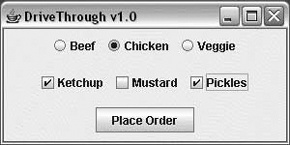
DriveThrough prints the results
when you press the Place Order button. Therefore, we can ignore all the
events generated by our checkboxes and radio buttons and listen only for
the action events generated by the submit button:
//file: DriveThrough.javaimportjava.awt.*;importjava.awt.event.*;importjavax.swing.*;publicclassDriveThrough{publicstaticvoidmain(String[]args){JFrameframe=newJFrame("Lister v1.0");JPanelentreePanel=newJPanel();finalButtonGroupentreeGroup=newButtonGroup();JRadioButtonradioButton;entreePanel.add(radioButton=newJRadioButton("Beef"));radioButton.setActionCommand("Beef");entreeGroup.add(radioButton);entreePanel.add(radioButton=newJRadioButton("Chicken"));radioButton.setActionCommand("Chicken");entreeGroup.add(radioButton);entreePanel.add(radioButton=newJRadioButton("Veggie",true));radioButton.setActionCommand("Veggie");entreeGroup.add(radioButton);finalJPanelcondimentsPanel=newJPanel();condimentsPanel.add(newJCheckBox("Ketchup"));condimentsPanel.add(newJCheckBox("Mustard"));condimentsPanel.add(newJCheckBox("Pickles"));JPanelorderPanel=newJPanel();JButtonorderButton=newJButton("Place Order");orderPanel.add(orderButton);Containercontent=frame.getContentPane();// unnecessary in 5.0+content.setLayout(newGridLayout(3,1));content.add(entreePanel);content.add(condimentsPanel);content.add(orderPanel);orderButton.addActionListener(newActionListener(){publicvoidactionPerformed(ActionEventae){Stringentree=entreeGroup.getSelection().getActionCommand();System.out.println(entree+" sandwich");Component[]components=condimentsPanel.getComponents();for(Componentc:components){JCheckBoxcb=(JCheckBox)c;if(cb.isSelected())System.out.println("With "+cb.getText());}}});frame.setDefaultCloseOperation(JFrame.EXIT_ON_CLOSE);frame.setSize(300,150);frame.setVisible(true);}}
DriveThrough lays out three
panels. The radio buttons in the entreePanel are tied together through a
ButtonGroup object. We
add() the buttons to a ButtonGroup to make them mutually exclusive. The
ButtonGroup object is an odd animal.
One might expect it to be a container or a component, but it isn’t; it’s
simply a helper object that allows only one RadioButton to be selected at a time.
In this example, the button group forces you to choose a beef,
chicken, or veggie entree, but not more than one. The condiment choices,
which are JCheckBoxes, aren’t in a
button group, so you can request any combination of ketchup, mustard, and
pickles on your sandwich.
When the Place Order button is pushed, we
receive an ActionEvent in the actionPerformed() method of our inner ActionListener. At this point, we gather the
information in the radio buttons and checkboxes and print it. actionPerformed() simply reads the state of the
various buttons. We could have saved references to the buttons in a number
of ways; this example demonstrates two. First, we find out which entree
was selected. To do so, we call the ButtonGroup’s getSelection() method.
This returns a ButtonModel, upon which
we immediately call getActionCommand().
This returns the action command as we set it when we created the radio
buttons. The action commands for the buttons are the entrée names, which
is exactly what we need.
To find which condiments were selected, we use a more complicated
procedure. The problem is that condiments aren’t mutually exclusive, so we
don’t have the convenience of a ButtonGroup. Instead, we ask the condiments
JPanel for a list of its components.
The getComponents() method returns an
array of references to the container’s child components. We’ll use this to
loop over the components and print the results. We cast each element of
the array back to JCheckBox and call its
isSelected() method to
see if the checkbox is on or off. If we were dealing with different types
of components in the array, we could determine each component’s type with
the instanceof operator. Or, more
generally, we could maintain references to the elements of our form in
some explicit way (a map by name, perhaps).