JList and JComboBox are two ways to let the user choose
from a set of values. A JComboBox has
added flexibility when it is made editable, but, in general, both of these
components are limited in that they can only prompt the user from a fixed
set of choices. In Java 1.4, Swing added a component called JSpinner that is useful for large or open-ended
sequences of values such as numbers or dates. The JSpinner is a cousin of the JComboBox; it displays a value in a field, but
instead of providing a drop-down list of choices, it gives the user a
small pair of up and down arrows for moving over a range of values (see
Figure 17-5). Like the combo box, a
JSpinner can also be made editable,
allowing the user to type a valid value directly into the field.
Swing provides three basic types of Spinners, represented by three different data
models for the JSpinner component:
SpinnerListModel,
SpinnerNumberModel, and
SpinnerDateModel.
The SpinnerListModel acts like a
combo box, specifying a fixed set of objects:
String[]options=newString[]{"small","medium","large","huge"};SpinnerListModelmodel=newSpinnerListModel(options);JSpinnerspinner=newJSpinner(model);
You can retrieve the current value from the model at any time:
Stringvalue=(String)model.getValue();
Alternatively, you can register a ChangeListener to receive updates as the user
changes values. With a SpinnerListModel, if the spinner is editable and
the user enters a value directly, it is validated against the set of
choices before being accepted. This behavior is a little different from
the other types of SpinnerModels which,
when editable, accept any valid value of the correct type (e.g., a number
or date).
The SpinnerNumberModel displays
numeric values. It can be configured with initial, minimum, and maximum
values:
doubleinitial=5.0,min=0.0,max=10.0,increment=0.1;SpinnerNumberModelmodel=newSpinnerNumberModel(initial,min,max,increment);JSpinnerspinner=newJSpinner(model);
Here we have constructed a spinner with an initial value of 5.0 that
allows the user to change the value to between 0 and 10.0 in increments of
0.1. The SpinnerNumberModel getNumber()
method retrieves the current value.
Perhaps the most interesting feature of the JSpinner is the SpinnerDateModel, which allows the user to
choose calendar dates by moving in specified increments of time. The
SpinnerDateModel accepts a range, such
as the SpinnerNumberModel, but the
values are Date objects and the
increment is a java.util.Calendar
constant field such as Calendar.DAY,
Calendar.WEEK, and so on. The following
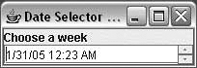
example, DateSelector, creates a
JSpinner showing the current date and
time. It allows the user to change the date in increments of one week,
over a range of one year (six months forward or back). A ChangeListener is registered with the model to
display the values as they are modified:
importjava.awt.*;importjava.awt.event.*;importjavax.swing.*;importjavax.swing.event.*;importjava.util.*;publicclassDateSelector{publicstaticvoidmain(String[]args){JFrameframe=newJFrame("DateSelector v1.0");Calendarnow=Calendar.getInstance();Calendarearliest=(Calendar)now.clone();earliest.add(Calendar.MONTH,-6);Calendarlatest=(Calendar)now.clone();latest.add(Calendar.MONTH,6);SpinnerModelmodel=newSpinnerDateModel(now.getTime(),earliest.getTime(),latest.getTime(),Calendar.WEEK_OF_YEAR);finalJSpinnerspinner=newJSpinner(model);// Disable the built-in date editorspinner.setEditor(newJSpinner.DefaultEditor(spinner));model.addChangeListener(newChangeListener(){publicvoidstateChanged(ChangeEvente){System.out.println(((SpinnerDateModel)e.getSource()).getDate());}});frame.getContentPane().add("North",newJLabel("Choose a week"));frame.getContentPane().add("Center",spinner);frame.pack();frame.setDefaultCloseOperation(JFrame.EXIT_ON_CLOSE);frame.setVisible(true);}}
As we said, the SpinnerCalendarModel acts just like the SpinnerNumberModel, except that it works with
Date objects and uses the special
Calendar constants as increments. To
create dates, we construct a Calendar object for the correct time and use its
getTime() method. In this example, we
used the Calendar’s add() method to set the minimum and maximum
values six months in each direction. Table 17-1 shows values for increments in the
Calendar.
Table 17-1. Calendar field values
Field value | Increment |
|---|---|
One millisecond | |
One second | |
One minute | |
| One hour |
A.M. or P.M. | |
One day | |
One month | |
One year | |
B.C. or A.D. in the Gregorian calendar |
The SpinnerDateModel uses the
Calendar add() method with a value of
1 or -1 and the corresponding constant value to
increment or decrement the value. Increments of one have the same effect
on several of the constants, as indicated in Table 17-1.