Any Swing component can have a decorative border. JComponent includes a method called setBorder() ; all you
have to do is call it, passing it an appropriate implementation of the
Border interface.
Swing provides many useful Border
implementations in the javax.swing.border
package. You could create an instance of one of these classes and pass it
to a component’s setBorder() method,
but there’s an even simpler technique.
The BorderFactory class creates
any kind of border for you using static “factory” methods. Creating and
setting a component’s border, then, is simple:
JLabellabelTwo=newJLabel("I have an etched border.");labelTwo.setBorder(BorderFactory.createEtchedBorder());
Every component has a setBorder()
method, from simple labels and buttons right up to the fancy text and
table components that we cover in Chapter 18.
BorderFactory is convenient, but
it does not offer every option of every border type. For example, if you
want to create a raised EtchedBorder instead of
the default lowered border, you’ll need to use EtchedBorder’s constructor, like this:
JLabellabelTwo=newJLabel("I have a raised etched border.");labelTwo.setBorder(newEtchedBorder(EtchedBorder.RAISED));
The Border implementation classes
are listed and briefly described here:
BevelBorderThis border draws raised or lowered beveled edges, giving an illusion of depth.
SoftBevelBorderEmptyBorderDoesn’t do any drawing, but does take up space. You can use it to give a component a little breathing room in a crowded user interface.
EtchedBorderA lowered etched border gives the appearance of a rectangle that has been chiseled into a piece of stone. A raised etched border looks like it is standing out from the surface of the screen.
LineBorderDraws a simple rectangle around a component. You can specify the color and width of the line in
LineBorder’s constructor.MatteBorderA souped-up version of
LineBorder. You can create aMatteBorderwith a certain color and specify the size of the border on the left, top, right, and bottom of the component.MatteBorderalso allows you to pass in anIconthat will be used to draw the border. This could be an image (ImageIcon) or any other implementation of theIconinterface.TitledBorderA regular border with a title.
TitledBorderdoesn’t actually draw a border; it just draws a title in conjunction with another border object. You can specify the locations of the title, its justification, and its font. This border type is particularly useful for grouping different sets of controls in a complicated interface.CompoundBorderA border that contains two other borders. This is especially handy if you want to enclose a component in an
EmptyBorderand then put something decorative around it, such as anEtchedBorderor aMatteBorder.
The following example shows off some different border types. It’s only a sampler, though; many more border types are available. Furthermore, the example only encloses labels with borders. You can put a border around any component in Swing. The example is shown in Figure 17-6.
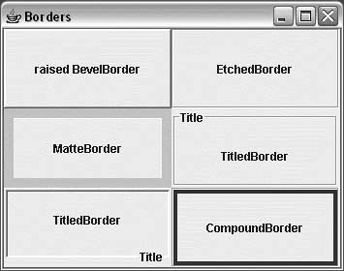
//file: Borders.javaimportjava.awt.*;importjava.awt.event.*;importjavax.swing.*;importjavax.swing.border.*;publicclassBorders{publicstaticvoidmain(String[]args){// create a JFrame to hold everythingJFrameframe=newJFrame("Borders");// Create labels with borders.intcenter=SwingConstants.CENTER;JLabellabelOne=newJLabel("raised BevelBorder",center);labelOne.setBorder(BorderFactory.createBevelBorder(BevelBorder.RAISED));JLabellabelTwo=newJLabel("EtchedBorder",center);labelTwo.setBorder(BorderFactory.createEtchedBorder());JLabellabelThree=newJLabel("MatteBorder",center);labelThree.setBorder(BorderFactory.createMatteBorder(10,10,10,10,Color.pink));JLabellabelFour=newJLabel("TitledBorder",center);Borderetch=BorderFactory.createEtchedBorder();labelFour.setBorder(BorderFactory.createTitledBorder(etch,"Title"));JLabellabelFive=newJLabel("TitledBorder",center);Borderlow=BorderFactory.createLoweredBevelBorder();labelFive.setBorder(BorderFactory.createTitledBorder(low,"Title",TitledBorder.RIGHT,TitledBorder.BOTTOM));JLabellabelSix=newJLabel("CompoundBorder",center);Borderone=BorderFactory.createEtchedBorder();Bordertwo=BorderFactory.createMatteBorder(4,4,4,4,Color.blue);labelSix.setBorder(BorderFactory.createCompoundBorder(one,two));// add components to the content paneContainerc=f.getContentPane();// unnecessary in 5.0+c.setLayout(newGridLayout(3,2));c.add(labelOne);c.add(labelTwo);c.add(labelThree);c.add(labelFour);c.add(labelFive);c.add(labelSix);frame.setDefaultCloseOperation(JFrame.EXIT_ON_CLOSE);frame.pack();frame.setVisible(true);}}