One of Swing’s nifty components is JPopupMenu, a context
menu that appears at the mouse location when you press the appropriate
mouse button or keystroke. (On a two-button mouse, clicking the right
mouse button invokes a pop-up menu. On a single-button Mac, you
Command-click.) Which button you press depends on the platform you’re
using; fortunately, from the code’s point of view you don’t have to
care—Swing figures it out for you.
The care and feeding of JPopupMenu is basically the same as any other
menu. You use a different constructor—JPopupMenu()—to create it, but otherwise, you
build a menu and add elements to it the same way. The big difference is
that you don’t attach it to a JMenuBar.
Instead, just pop up the menu whenever and wherever you need it. Prior to
Java 5.0, this process is a little cumbersome; you have to register to
receive the appropriate mouse events, check them to see if they are the
pop-up trigger and then pop the menu manually. With Java 5.0, the process
is simplified by having components manage their own pop-up menus.
First, we’ll show an example of explicit pop-up handling. The
following example, PopupColorMenu,
contains three buttons. You can use a JPopupMenu to set the color of each button or
the background frame itself, depending on where you click the
mouse.
//file: PopUpColorMenu.javaimportjava.awt.*;importjava.awt.event.*;importjavax.swing.*;publicclassPopUpColorMenuimplementsActionListener{ComponentselectedComponent;publicPopUpColorMenu(){JFrameframe=newJFrame("PopUpColorMenu v1.0");finalJPopupMenucolorMenu=newJPopupMenu("Color");colorMenu.add(makeMenuItem("Red"));colorMenu.add(makeMenuItem("Green"));colorMenu.add(makeMenuItem("Blue"));MouseListenermouseListener=newMouseAdapter(){publicvoidmousePressed(MouseEvente){checkPopup(e);}publicvoidmouseClicked(MouseEvente){checkPopup(e);}publicvoidmouseReleased(MouseEvente){checkPopup(e);}privatevoidcheckPopup(MouseEvente){if(e.isPopupTrigger()){selectedComponent=e.getComponent();colorMenu.show(e.getComponent(),e.getX(),e.getY());}}};Containercontent=frame.getContentPane();// unnecessary in 5.0+content.setLayout(newFlowLayout());JButtonbutton=newJButton("Uno");button.addMouseListener(mouseListener);content.add(button);button=newJButton("Due");button.addMouseListener(mouseListener);content.add(button);button=newJButton("Tre");button.addMouseListener(mouseListener);content.add(button);frame.getContentPane().addMouseListener(mouseListener);frame.setSize(200,50);frame.setDefaultCloseOperation(JFrame.EXIT_ON_CLOSE);frame.setVisible(true);}publicvoidactionPerformed(ActionEvente){Stringcolor=e.getActionCommand();if(color.equals("Red"))selectedComponent.setBackground(Color.red);elseif(color.equals("Green"))selectedComponent.setBackground(Color.green);elseif(color.equals("Blue"))selectedComponent.setBackground(Color.blue);}privateJMenuItemmakeMenuItem(Stringlabel){JMenuItemitem=newJMenuItem(label);item.addActionListener(this);returnitem;}publicstaticvoidmain(String[]args){newPopUpColorMenu();}}
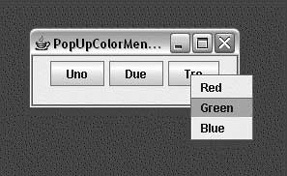
Figure 17-8 shows the example in action; the user is preparing to change the color of the bottom button.
Because the pop-up menu is triggered by mouse events (in this
example), we need to register a MouseListener for any of the components to which
it applies. In this example, all three buttons and the content pane of the
frame are eligible for the color pop-up menu. Therefore, we add a mouse
event listener for all these components explicitly. The same instance of
an anonymous inner MouseAdapter
subclass is used in each case. In this class, we override the mousePressed(),
mouseReleased(), and
mouseClicked() methods to
display the pop-up menu when we get an appropriate event. How do we know
what an “appropriate event” is? Fortunately, we don’t need to worry about
the specifics of our user’s platform; we just need to call the event’s
isPopupTrigger() method.
If this method returns true, we know
the user has done whatever normally displays a pop-up menu on his
system.
Once we know that the user wants to raise a pop-up menu, we display
it by calling its show() method with the
mouse event coordinates as arguments.
If we want to provide different menus for different types of components or the background, we create different mouse listeners for each different kind of component. The mouse listeners invoke different kinds of pop-up menus as appropriate.
The only thing left is to handle the action events from the pop-up
menu items. We use a helper method called makeMenuItem() to register the PopUpColorMenu window as an action listener for
every item we add. The example implements ActionListener and has the required actionPerformed() method. This method reads the
action command from the event, which is equal to the selected menu item’s
label by default. It then sets the background color of the selected
component appropriately.
Things get a bit easier in Java 5.0, using the new pop-up menu API
for components. In Java 5.0, any JComponent can manage a JPopupMenu directly with the setComponentPopupMenu()
method. JComponents can also be told
to simply inherit their parent container’s pop-up menu via the
setInheritsPopupMenu()
method. This combination makes it very simple to implement a context
menu that should appear in many components within a container.
Unfortunately, this doesn’t lend itself well to our previous
example (PopupColorMenu) for two
reasons. First, we need to know which component the mouse was in when
the pop up was triggered and we don’t get that information using this
API. The pop-up handling is actually delegated to the container, not
inherited. Second, not all types of components are registered to receive
mouse events by default.[40] As a result, we’ll create a new example that is more
appropriate for a “one context menu to rule them all” application. The
following example, ContextMenu, shows
a TextArea and TextField that both inherit the same JPopupMenu from their JPanel container. When you select a menu item,
the action is displayed in the text area.
importjava.awt.*;importjava.awt.event.*;importjavax.swing.*;publicclassContextMenuimplementsActionListener{JTextAreatextArea=newJTextArea();publicContextMenu(){finalJPopupMenucontextMenu=newJPopupMenu("Edit");contextMenu.add(makeMenuItem("Save"));contextMenu.add(makeMenuItem("Save As"));contextMenu.add(makeMenuItem("Close"));JFrameframe=newJFrame("ContextMenu v1.0");JPanelpanel=newJPanel();panel.setLayout(newBorderLayout());frame.getContentPane().add(panel);panel.setComponentPopupMenu(contextMenu);textArea.setInheritsPopupMenu(true);panel.add(BorderLayout.CENTER,textArea);JTextFieldtextField=newJTextField();textField.setInheritsPopupMenu(true);panel.add(BorderLayout.SOUTH,textField);frame.setDefaultCloseOperation(JFrame.EXIT_ON_CLOSE);frame.setSize(400,200);frame.setVisible(true);}publicvoidactionPerformed(ActionEvente){textArea.append(e.getActionCommand()+"\n");}privateJMenuItemmakeMenuItem(Stringlabel){JMenuItemitem=newJMenuItem(label);item.addActionListener(this);returnitem;}publicstaticvoidmain(String[]args){newContextMenu();}}
We’ve constructed our JPopupMenu as before, but this time we are not
responsible for listening for mouse clicks or triggering the pop up
explicitly. Instead, we use the setComponentPopupMenu()
method to ask the JPanel to handle it
for us. We use setInheritsPopupMenu()
on both the JTextArea and JTextField so that they will both delegate
pop-up trigger mouse clicks to the JPanel automatically.
[40] Components such as JPanel
and JLabel by default do not
expect to handle mouse events. When you register a listener such as
MouseListener, it registers
itself internally to begin processing these events. Unfortunately,
at the time of this writing, using setInheritsPopupMenu() does not trigger
this functionality. As a workaround, you could register a dummy
mouse listener with these components to prompt them to expect mouse
events and properly trigger context menus if you want them.