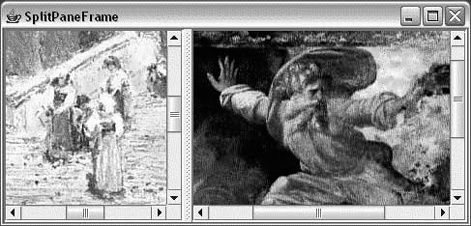
A split pane is a special container that holds two components, each in its own subpane. A splitter bar adjusts the sizes of the two subpanes. In a document viewer, for example, you might use a split pane to show a table of contents next to a page of text.
The following example uses two JLabels containing ImageIcons, like the previous example. It
displays the two labels, wrapped in JScrollPanes, on either side of a JSplitPane (see Figure 17-10). You can drag the splitter bar back
and forth to adjust the sizes of the two contained components.
//file: SplitPaneFrame.javaimportjava.awt.*;importjava.awt.event.*;importjavax.swing.*;importjavax.swing.border.*;publicclassSplitPaneFrame{publicstaticvoidmain(String[]args){StringfileOne="Piazza di Spagna.jpg";StringfileTwo="L1-Light.jpg";if(args.length>0)fileOne=args[0];if(args.length>1)fileTwo=args[1];JFrameframe=newJFrame("SplitPaneFrame");JLabelleftImage=newJLabel(newImageIcon(fileOne));Componentleft=newJScrollPane(leftImage);JLabelrightImage=newJLabel(newImageIcon(fileTwo));Componentright=newJScrollPane(rightImage);JSplitPanesplit=newJSplitPane(JSplitPane.HORIZONTAL_SPLIT,left,right);split.setDividerLocation(100);frame.getContentPane().add(split);frame.setDefaultCloseOperation(JFrame.EXIT_ON_CLOSE);frame.setSize(300,200);frame.setVisible(true);}}