In this chapter and the previous one, we’ve worked with different user interface objects. We’ve used Swing’s impressive repertoire of components as building blocks and extended their functionality, but we haven’t actually created any new components. In this section, we create an entirely new component from scratch, a dial.
Until now, our examples have been fairly self-contained; they
generally know everything about what to do and don’t rely on additional
parts to do processing. Our menu example created a DinnerFrame class that had a menu of dinner
options, but it included all the processing needed to handle the user’s
selections. If we wanted to process the selections differently, we’d have
to modify the class. A true component separates the detection of user
input from the handling of those choices. It lets the user take some
action and then informs other interested parties by emitting
events.
Because we want our new classes to be components, they should communicate the way components communicate: by generating event objects and sending those events to listeners. So far, we’ve written a lot of code that listened for events but haven’t seen an example that generated its own custom events.
Generating events sounds like it might be difficult, but it isn’t.
You can either create new kinds of events by subclassing java.util.EventObject, or use one of the
standard event types. In either case, you just need to allow
registration of listeners for your events and provide a means to deliver
events to those listeners. Swing’s JComponent class provides a protected member
variable called listenerList, which
you can use to keep track of event listeners. It’s an instance of
EventListenerList; basically it acts
like the maître d’ at a restaurant, keeping track of all event
listeners, sorted by type.
Often, you won’t need to worry about creating a custom event type.
JComponent has methods that support
firing of generic PropertyChangeEvents whenever one of a
component’s properties changes. The example we’ll look at next uses this
infrastructure to fire PropertyChangeEvents whenever a value
changes.
The standard Swing classes don’t have a component that’s
similar to an old-fashioned dial—for example, the volume control on your
radio. (The JSlider fills this role,
of course.) In this section, we implement a Dial class. The dial has a value that can be
adjusted by clicking and dragging to “twist” the dial (see Figure 18-11). As the value of the dial
changes, DialEvents are fired off by
the component. The dial can be used just like any other Java component.
We even have a custom DialListener
interface that matches the DialEvent
class.
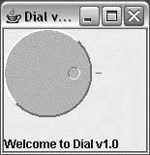
Here’s the Dial code:
//file: Dial.javaimportjava.awt.*;importjava.awt.event.*;importjava.util.*;importjavax.swing.*;publicclassDialextendsJComponent{intminValue,nvalue,maxValue,radius;publicDial(){this(0,100,0);}publicDial(intminValue,intmaxValue,intvalue){setMinimum(minValue);setMaximum(maxValue);setValue(value);setForeground(Color.lightGray);addMouseListener(newMouseAdapter(){publicvoidmousePressed(MouseEvente){spin(e);}});addMouseMotionListener(newMouseMotionAdapter(){publicvoidmouseDragged(MouseEvente){spin(e);}});}protectedvoidspin(MouseEvente){inty=e.getY();intx=e.getX();doubleth=Math.atan((1.0*y-radius)/(x-radius));intvalue=(int)(th/(2*Math.PI)*(maxValue-minValue));if(x<radius)setValue(value+(maxValue-minValue)/2+minValue);elseif(y<radius)setValue(value+maxValue);elsesetValue(value+minValue);}publicvoidpaintComponent(Graphicsg){Graphics2Dg2=(Graphics2D)g;inttick=10;radius=Math.min(getSize().width,getSize().height)/2-tick;g2.setPaint(getForeground().darker());g2.drawLine(radius*2+tick/2,radius,radius*2+tick,radius);g2.setStroke(newBasicStroke(2));draw3DCircle(g2,0,0,radius,true);intknobRadius=radius/7;doubleth=nvalue*(2*Math.PI)/(maxValue-minValue);intx=(int)(Math.cos(th)*(radius-knobRadius*3)),y=(int)(Math.sin(th)*(radius-knobRadius*3));g2.setStroke(newBasicStroke(1));draw3DCircle(g2,x+radius-knobRadius,y+radius-knobRadius,knobRadius,false);}privatevoiddraw3DCircle(Graphicsg,intx,inty,intradius,booleanraised){Colorforeground=getForeground();Colorlight=foreground.brighter();Colordark=foreground.darker();g.setColor(foreground);g.fillOval(x,y,radius*2,radius*2);g.setColor(raised?light:dark);g.drawArc(x,y,radius*2,radius*2,45,180);g.setColor(raised?dark:light);g.drawArc(x,y,radius*2,radius*2,225,180);}publicDimensiongetPreferredSize(){returnnewDimension(100,100);}publicvoidsetValue(intvalue){this.nvalue=value-minValue;repaint();fireEvent();}publicintgetValue(){returnnvalue+minValue;}publicvoidsetMinimum(intminValue){this.minValue=minValue;}publicintgetMinimum(){returnminValue;}publicvoidsetMaximum(intmaxValue){this.maxValue=maxValue;}publicintgetMaximum(){returnmaxValue;}publicvoidaddDialListener(DialListenerlistener){listenerList.add(DialListener.class,listener);}publicvoidremoveDialListener(DialListenerlistener){listenerList.remove(DialListener.class,listener);}voidfireEvent(){Object[]listeners=listenerList.getListenerList();for(inti=0;i<listeners.length;i+=2)if(listeners[i]==DialListener.class)((DialListener)listeners[i+1]).dialAdjusted(newDialEvent(this,getValue()));}publicstaticvoidmain(String[]args){JFrameframe=newJFrame("Dial v1.0");finalJLabelstatusLabel=newJLabel("Welcome to Dial v1.0");finalDialdial=newDial();frame.add(dial,BorderLayout.CENTER);frame.add(statusLabel,BorderLayout.SOUTH);dial.addDialListener(newDialListener(){publicvoiddialAdjusted(DialEvente){statusLabel.setText("Value is "+e.getValue());}});frame.setDefaultCloseOperation(JFrame.EXIT_ON_CLOSE);frame.setSize(150,150);frame.setVisible(true);}}
Here’s DialEvent, a simple
subclass of java.util.EventObject:
//file: DialEvent.javaimportjava.awt.*;publicclassDialEventextendsjava.util.EventObject{intvalue;DialEvent(Dialsource,intvalue){super(source);this.value=value;}publicintgetValue(){returnvalue;}}
Finally, here’s the code for DialListener:
//file: DialListener.javapublicinterfaceDialListenerextendsjava.util.EventListener{voiddialAdjusted(DialEvente);}
Let’s start from the top of the Dial class. We’ll focus on the structure and
leave you to figure out the trigonometry on your own.
Dial’s main() method demonstrates how to use the dial
to build a user interface. It creates a Dial and adds it to a JFrame. Then main() registers a dial listener on the dial.
Whenever a DialEvent is received, the
value of the dial is examined and displayed in a JLabel at the bottom of the frame
window.
The constructor for the Dial
class stores the dial’s minimum, maximum, and current values; a default
constructor provides a minimum of 0,
a maximum of 100, and a current value
of 0. The constructor sets the
foreground color of the dial and registers listeners for mouse events.
If the mouse is pressed or dragged, Dial’s spin() method is called to update the dial’s
value. spin() performs some basic
trigonometry to figure out what the new value of the dial should
be.
paintComponent() and draw3DCircle() do a lot of trigonometry to
figure out how to display the dial. draw3DCircle() is a private helper method that
draws a circle that appears either raised or depressed; we use this to
make the dial look three-dimensional.
The next group of methods provides ways to retrieve or change the
dial’s current setting and the minimum and maximum values. The important
thing to notice here is the pattern of get and set methods for all of
the important values used by the Dial. We will talk more about this in Chapter 22. Also, notice that the setValue() method does two important things: it repaints the
component to reflect the new value and fires the DialEvent
signifying the change.
The final group of methods in the Dial class provides the plumbing necessary for
our event firing. addDialListener()
and removeDialListener() take care of
maintaining the listener list. Using the listenerList member variable we inherited from
JComponent makes this an easy task.
The fireEvent() method retrieves the
registered listeners for this component. It sends a DialEvent to any registered DialListeners.
The Dial example is overly
simplified. All Swing components, as we’ve discussed, keep their data
model and view separate. In the Dial
component, we’ve combined these elements in a single class, which limits
its reusability. To have Dial
implement the MVC paradigm, we would have developed a dial data model
and something called a UI-delegate that handled displaying the component
and responding to user events. For a full treatment of this subject, see
the JogShuttle example in O’Reilly’s
Java
Swing.
In Chapter 19, we’ll take what we know about components and containers and put them together using layout managers to create complex GUIs.