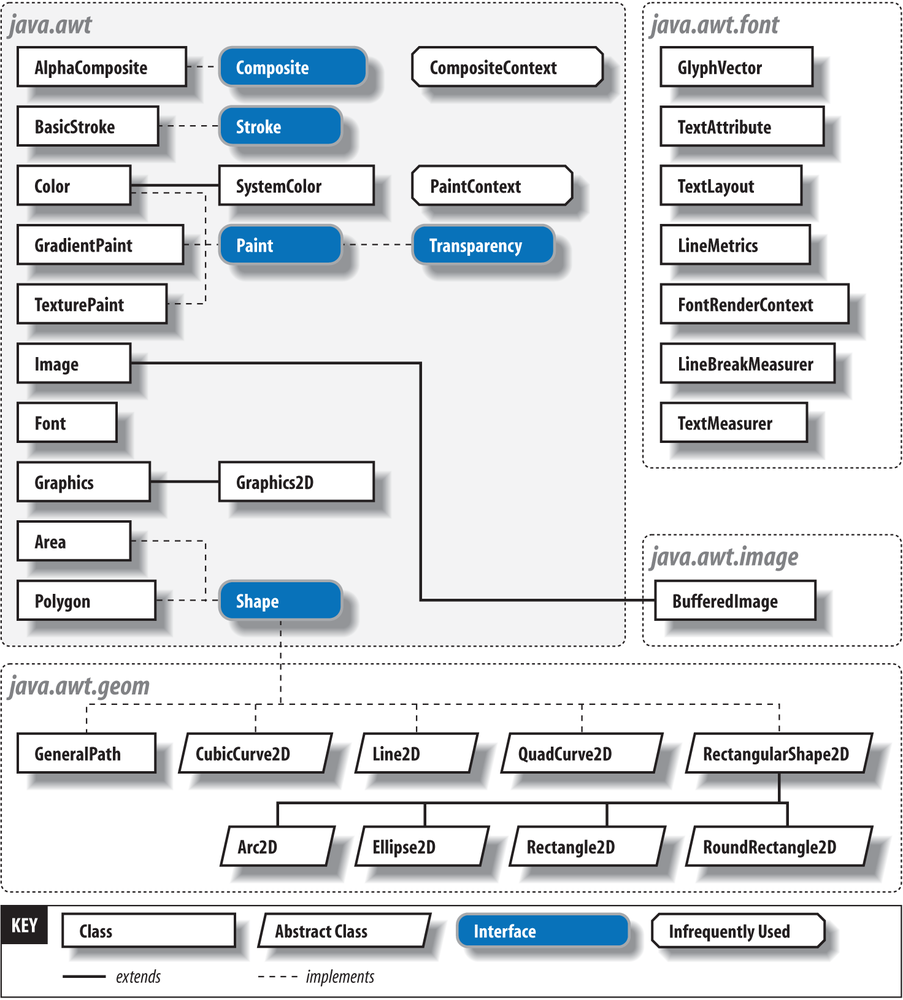
The classes you’ll use for drawing come from six packages:
java.awt, java.awt.color,
java.awt.font, java.awt.geom, java.awt.image, and
java.awt.print.
Collectively, these classes make up most of the 2D API and cover the
drawing of shapes, text, and images. Figure 20-1 shows a bird’s-eye view of these
classes. There’s much more in the 2D API than we can cover in two
chapters. For a full treatment, see Jonathan Knudsen’s Java 2D
Graphics (O’Reilly).
An instance of java.awt.Graphics2D is called a
graphics context. It represents a drawing
surface—such as a component’s display area, a page on a printer, or an
offscreen image buffer. A graphics context provides methods for drawing
three kinds of graphics objects: shapes, text, and images. Graphics2D is called a graphics context because
it also holds contextual information about the drawing area. This
information includes the drawing area’s clipping region, painting color,
transfer mode, text font, and geometric transformation. If you consider the drawing
area to be a painter’s canvas, you might think of a graphics context as an
easel that holds a set of tools and marks off the work area.
There are four ways to acquire a Graphics2D object. The following list describes
them in order from the most common to the least:
- From AWT or Swing as the result of a painting request on a component
In this case, a new graphics context for the appropriate area is created and passed to your component’s
paint()orupdate()method. (Theupdate()method really applies only to AWT components, not the newer Swing components.)- Directly from an offscreen image buffer
In this case, we ask the image buffer for a graphics context directly. We’ll use this when we discuss techniques such as double buffering.
- By copying an existing
Graphics2Dobject Duplicating a graphics object can be useful for more elaborate drawing operations; different copies of a
Graphics2Dobject can draw on the same area, but with different attributes and clipping regions. AGraphics2Dobject can be copied by calling thecreate()method.- Directly from an onscreen component
It’s possible to ask a component to give you a
Graphics2Dobject for its display area. However, this is almost always a mistake; if you feel tempted to do this, think about why you’re trying to circumvent the normalpaint()/repaint()mechanism.
Each time a component’s paint() method is called,
the windowing system provides the component with a new Graphics2D object for drawing in the display
area. This means that attributes set during one painting session, such as
the drawing color or clipping region, are reset the next time paint() is called. (Each call to paint() starts with a tidy new easel.) For the
most common attributes, such as foreground color, background color, and
font, we can set defaults in the component itself. Thereafter, the
graphics contexts for painting in that component come with those
properties initialized appropriately.
The paint() method can make no
assumptions about what is already drawn on the screen. It is responsible
for rendering its entire work area. Higher-level APIs are normally
responsible for buffering output and limiting the number of times paint() is invoked for a component. AWT
components may use an additional method called update(), which allows
them to update their appearance under the assumption that their previous
artwork is still on the screen. However, this method is not used by Swing
components.
For backward compatibility, a graphics context is always passed to
the paint() method as an object of type
Graphics. If you want to take advantage
of the nifty features in the 2D API (as you almost undoubtedly will), you
need to cast this reference to a Graphics2D object. You’ll see how this works in
the upcoming examples.