In the last section, we used SAX to parse an XML document and build
a Java object model representing it. In that case, we created specific
Java types for each of our complex elements. If we were planning to use
our model extensively in an application, this technique would give us a
great deal of flexibility. But often it is sufficient (and much easier) to
use a “generic” model that simply represents the content of the XML in a
neutral form. The Document Object Model (DOM) is just that. The DOM API
parses an XML document into a generic representation consisting of classes
with names such as Element and Attribute that hold their own values. You could
use this to inspect the document structure and pull out the parts you want
in a way that is perhaps more convenient than the low-level SAX. The
tradeoff is that the entire document is parsed and read into memory—but
for most applications, that is fine.
As we saw in our zoo example, once you have an object model, using the data is a breeze. So a generic DOM would seem like an appealing solution, especially when working mainly with text. One catch in this case is that DOM didn’t evolve first as a Java API and it doesn’t map well to Java. DOM is very complete and provides access to every facet of the original XML document, but it’s so generic (and language-neutral) that it’s cumbersome to use in Java. Later, we’ll also mention a native Java alternative to DOM called JDOM that is more pleasant to use.
The core DOM classes belong to the org.w3c.dom package. The result of parsing an
XML document with DOM is a Document object from
this package (see Figure 24-1). The
Document is both a factory and a
container for a hierarchical collection of Node objects, representing the document
structure. A node has a parent and may have children, which can be
traversed using its getChildNodes(),
getFirstChild(), or
getLastChild() methods.
A node may also have “attributes” associated with it, which consist of a
named map of nodes.
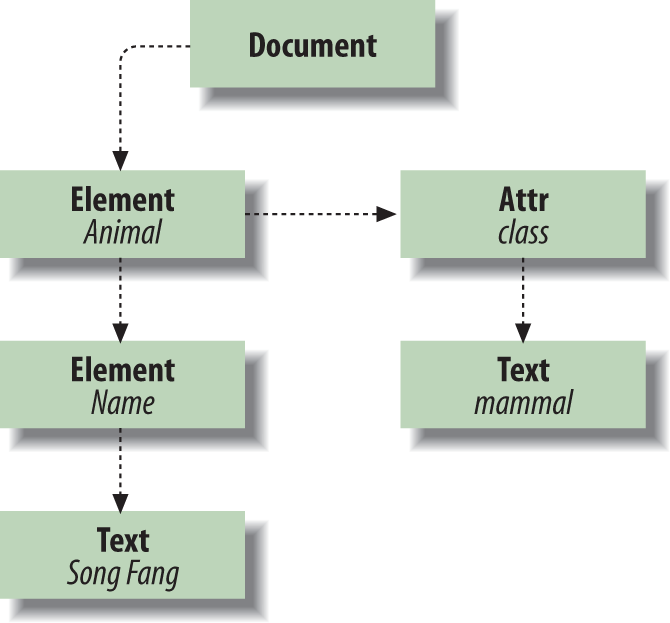
Subtypes of Node—Element, Text, and Attr—represent elements, text, and attributes
in XML. Some types of nodes (including these) have a text “value.” For
example, the value of a Text node is
the text of the element it represents. The same is true of an attribute, cdata, or comment node. The value of a node can be
accessed by the getNodeValue() and
setNodeValue() methods.
We’ll also make use of Node’s
getTextContent()
method, which retrieves the plain-text content of the node and all of
its child nodes.
The Element node provides
“random” access to its child elements through its getElementsByTagName()
method, which returns a NodeList (a
simple collection type). You can also fetch an attribute by name from
the Element using the getAttribute()method.
The javax.xml.parsers package
contains a factory for DOM parsers, just as it does for SAX parsers. An
instance of DocumentBuilderFactory
can be used to create a DocumentBuilder object
to parse the file and produce a Document result.
importjavax.xml.parsers.*;importorg.w3c.dom.*;publicclassTestDOM{publicstaticvoidmain(String[]args)throwsException{DocumentBuilderFactoryfactory=DocumentBuilderFactory.newInstance();DocumentBuilderparser=factory.newDocumentBuilder();Documentdocument=parser.parse("zooinventory.xml");Elementinventory=document.getDocumentElement();NodeListanimals=inventory.getElementsByTagName("animal");System.out.println("Animals = ");for(inti=0;i<animals.getLength();i++){Elementitem=(Element)animals.item(i);Stringname=item.getElementsByTagName("name").item(0).getTextContent();Stringspecies=item.getElementsByTagName("species").item(0).getTextContent();StringanimalClass=item.getAttribute("animalClass");System.out.println(" "+name+" ("+animalClass+","+species+")");}Elementcocoa=(Element)animals.item(1);Elementrecipe=(Element)cocoa.getElementsByTagName("foodRecipe").item(0);StringrecipeName=recipe.getElementsByTagName("name").item(0).getTextContent();System.out.println("Recipe = "+recipeName);NodeListingredients=recipe.getElementsByTagName("ingredient");for(inti=0;i<ingredients.getLength();i++){System.out.println(" "+ingredients.item(i).getTextContent());}}}
TestDOM creates an instance of
a DocumentBuilder and uses it to
parse our zooinventory.xml file. We use the
DocumentgetDocumentElement()
method to get the root element of the document, from which we will begin
our traversal. From there, we ask for all the animal child nodes. The getElementbyTagName()
method returns a NodeList object,
which we then use to iterate through our creatures. For each animal, we
use the ElementgetElementsByTagName() method to retrieve the
name and species child element information. Each of those queries can
potentially return a list of matching elements, but we only allow for
one here by taking the first element returned and asking for its text
content. We also use the getAttribute() method
to retrieve the animalClass attribute
from the element.
Next, we use the getElementsByTagName() to retrieve the element
called foodRecipe from the second
animal. We use it to fetch a NodeList
for all of the tags matching ingredient and print them as before. The
output should contain the same information as our SAX-based example. But
as you can see, the tradeoff in not having to create our own model
classes is that we have to suffer through the use of the generic model
and produce code that is considerably harder to read and less
flexible.
Thus far, we’ve used the SAX and DOM APIs to parse XML.
But what about generating XML? Sure, it’s easy to generate trivial XML
documents simply by printing the appropriate strings. But if we plan to
create a complex document on the fly, we might want some help with all
those quotes and closing tags. We may also want to validate our model
against an XML DTD or Schema before writing it out. What we can do is to
build a DOM representation of our object in memory and then transform it
to text. This is also useful if we want to read a document and then make
some alterations to it. To do this, we’ll use of the java.xml.transform
package. This package does a lot more than just printing XML. As its
name implies, it’s part of a general transformation facility. It
includes the XSL/XSLT languages for generating one XML document from
another. (We’ll talk about XSL later in this chapter.)
We won’t discuss the details of constructing a DOM in memory here,
but it follows fairly naturally from what you’ve learned about
traversing the tree in our previous example. The following example,
PrintDOM, simply parses our
zooinventory.xml file to a DOM and then prints that
DOM back to the screen. The same output code would print any DOM whether
read from a file or created in memory using the factory methods on the
DOM Document and Element, etc.
importjavax.xml.parsers.*;importorg.xml.sax.InputSource;importorg.w3c.dom.*;importjavax.xml.transform.*;importjavax.xml.transform.dom.DOMSource;importjavax.xml.transform.stream.StreamResult;publicclassPrintDOM{publicstaticvoidmain(String[]args)throwsException{DocumentBuilderparser=DocumentBuilderFactory.newInstance().newDocumentBuilder();Documentdocument=parser.parse(newInputSource("zooinventory.xml"));Transformertransformer=TransformerFactory.newInstance().newTransformer();Sourcesource=newDOMSource(document);Resultoutput=newStreamResult(System.out);transformer.transform(source,output);}}
Note that the imports are almost as long as the entire program!
Here, we are using an instance of a Transformer object in its simplest capacity to
copy from a source to an output. We’ll return to the Transformer later when we discuss XSL, at
which point it will be doing a lot more work for us.
As we promised earlier, we’ll now describe an easier DOM
API: JDOM, created by Jason Hunter and Brett McLaughlin, two fellow
O’Reilly authors (Java
Servlet Programming and Java
and XML, respectively). It is a more natural Java DOM
that uses real Java collection types such as List for its hierarchy and provides marginally
more streamlined methods for building documents. You can get the latest
JDOM from http://www.jdom.org/. Here’s
the JDOM version of our standard “test” program:
importorg.jdom.*;importorg.jdom.input.*;importorg.jdom.output.*;importjava.util.*;publicclassTestJDOM{publicstaticvoidmain(String[]args)throwsException{Documentdoc=newSAXBuilder().build("zooinventory.xml");Listanimals=doc.getRootElement().getChildren("Animal");System.out.println("Animals = ");for(inti=0;i<animals.size();i++){Stringname=((Element)animals.get(i)).getChildText("Name");Stringspecies=((Element)animals.get(i)).getChildText("Species");System.out.println(" "+name+" ("+species+")");}ElementfoodRecipe=((Element)animals.get(1)).getChild("FoodRecipe");Stringname=foodRecipe.getChildText("Name");System.out.println("Recipe = "+name);Listingredients=foodRecipe.getChildren("Ingredient");for(inti=0;i<ingredients.size();i++)System.out.println(" "+((Element)ingredients.get(i)).getText());}}
The JDOM Element class has some
convenient getChild() and
getChildren() methods,
as well as a getChildText() method
for retrieving node text by element name.
Now that we’ve covered the basics of SAX and DOM, we’re going to look at a new API that, in a sense, straddles the two. XPath allows us to target only the parts of a document that we want and gives us the option of getting at those components in DOM form.