Chapter 6. Building Your Project
Output Formats
Atlas lets you build your project to four different output formats, depending on your needs and audience: PDF, EPUB, MOBI, and HTML.
The PDF format gives you a fixed-page rendering of your project. The content is split into static pages that will never change, much like a printed book. In fact, PDF is the file format that you’d use if you wanted to send your project to a professional printing press, in order to create printed books.
Atlas offers you the option to either create a print-ready PDF, or to create a PDF optimized for reading on the screen (many people still prefer to read ebooks in PDF format on their PCs). You can choose which type of PDF you’d like in the Build Settings.
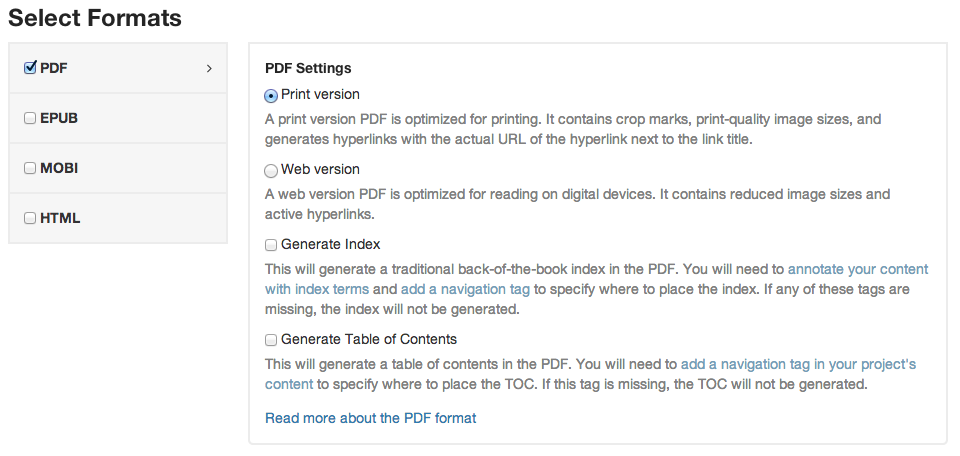
Figure 6-1. The first two options in the Build Settings for the PDF format let you choose whether you want to create a PDF for print, or for digital reading.
EPUB
EPUB is the main file format used by devices like the iPad and Nook. Unlike a PDF, the EPUBs created by Atlas are reflowable--this means that users can change things like text sizes and margins, and the content will reflow across the “pages” of the device.
EPUB is a standard maintained by the International Digital Publishing Forum. In order to make it easier for device makers (like Apple) and content creators (like you) to build compatible products, the EPUB standard defines a number of rules about how the content should be encoded. Don’t worry though: Atlas takes care of making your files completely valid and compliant, so all you need to worry about is creating something great.
MOBI
Amazon has their own proprietary ebook format called MOBI, that is specifically designed to work with all Kindle devices and apps.
HTML
Atlas comes with an option to export your project as a fully-functional website that you can upload to the server of your choice. When you build the project, you’ll receive a zip file of the project files, CSS, images, and any custom JavaScripts or other assets you’ve chosen to include.
Including Custom JavaScripts
You can include custom javascript files by hard-coding links into your “The HTML layout file” file, or by adding them to your Chapter 8 file.
Shared Options
Table of Contents
All of the build formats offer the option to generate a table of contents based on your project chapter titles and headings. This saves you from having to manually update your table of contents every time the content gets restructured or a title changes. Atlas will build a table of contents for you, by automatically pulling together a nested list of all your chapter-level titles, as well as the first two levels of headings.
There are two things you need to successfully generate a TOC:
- Enable TOC generation. You can do this under “Build Settings” for the format(s) you’re trying to build, or directly in
atlas.jsonas Chapter 8. - Add a
{{ toc }}placeholder tag in your content. This tag needs to be a root tag in your content--that means that it needs to be in a file, all on it’s own, and cannot be nested inside a chapter or in a<section>tag.
Index
All of the build formats have the option to generate a back-of-the-book index. There are three things you need to successfully generate an index:
- Enable index generation. You can do this under “Build Settings” or directly in
atlas.jsonas Chapter 8. - Add an
{{ index }}placeholder tag in your content. This tag needs to be a root tag in your content—that means that it needs to be in a file, all on its own, and cannot be nested inside a chapter or in a<section>tag. -
print('hello world') - Go through your content and mark up the words you want in the index. This is a time-consuming process, but it’s hard to automate. You can use our ??? to make the process easier. If you prefer to work in code view, then index entries, often called index tags, should be inserted as empty
atags, stating the level of the tag, as follows: -
<adata-type="indexterm"data-primary="ingredients"data-secondary="salt"></a>